

A WordPress hidden admin account is spreading through two unrelated plugins right now, and most site owners have no idea it is sitting in their database. Security researchers at Patchstack caught attackers using stored cross-site scripting (XSS) flaws in Ninja Forms and WPC Product Bundles for WooCommerce to plant a hidden administrator on compromised sites, hide it from the Users screen, and leave three more ways back in even after the obvious signs are cleaned up.
If you run either plugin, or you just want to know what a hidden admin account actually looks like from the inside, this guide walks through how the attack works, how to check your own site in the next ten minutes, and exactly what to do if you find one.
What’s Happening: A New Campaign Hits Two Unrelated Plugins
On October 6, 2026, Patchstack published an analysis of a campaign that chains two separate stored XSS vulnerabilities into the same post-exploitation attack. One flaw sits in Ninja Forms (CVE-2026-94504), installed on more than 500,000 sites. The other sits in WPC Product Bundles for WooCommerce (CVE-2026-93836), installed on more than 30,000 sites. Both were publicly disclosed on September 22, 2026, and both are rated CVSS 7.1.
The two plugins have nothing in common on the surface. One builds forms, the other bundles WooCommerce products. What connects them is the payload. Once an administrator’s browser executes the injected script from either plugin, it pulls the same second-stage file from a single domain, imgcdn1.com, registered on October 1, 2026. Patchstack first observed exploitation against WPC Product Bundles on October 4 and against Ninja Forms the following day, just two weeks after Ninja Forms shipped its fix.
That detail matters more than the specific plugins involved. Patchstack’s own wording is blunt about it: “Two is what we have confirmed, not what we expect the final count to be.” The attackers appear to be collecting stored XSS bugs wherever they appear, then dropping the same WordPress hidden admin account toolkit regardless of the entry point. BleepingComputer’s reporting on the same campaign reached the same conclusion independently, which is a useful cross-check for anyone wondering whether this is overblown.
This is not WordPress’s first hidden-admin scare this year, either. Core itself shipped an emergency fix for an unauthenticated LFI-to-RCE flaw in the WordPress 7.1.2 security release, and attackers were reportedly probing sites within hours of that patch going out. The pattern keeps repeating: a vulnerability gets disclosed, a patch ships, and a narrow window opens before most site owners actually update.
How a Hidden WordPress Admin Account Gets Created
Understanding the mechanics is what makes the warning signs below make sense. Here is the chain, step by step.
The attacker stores a malicious script tag somewhere an administrator will eventually view it. In WPC Product Bundles, that’s a WooCommerce order’s quantity field. In Ninja Forms, it’s a submitted form field rendered unsafely in the legacy admin submission editor. Either way, the script sits quietly until someone with admin rights opens that order or submission in wp-admin.
When that happens, the script runs inside the administrator’s own browser session. It does not need to steal cookies, since many are marked HttpOnly. Instead, it loads admin pages in the background, scrapes the CSRF security tokens (nonces) those pages generate, and replays them to perform admin actions as if the real administrator clicked the buttons.
Using that borrowed session, the script:
- Installs a fake plugin through WordPress’s own plugin uploader, disguised as “WP Smart Thumbnails” by a fictitious “MediaPress Labs.”
- Creates a brand-new WordPress hidden admin account with an everyday-sounding username (support, updater, backup, maintenance) and an
@wordpress.orgemail address. - Runs a persistence script that hides the account and builds a backup login path.
- Reports success back to the attacker’s command server.
The hiding itself happens through two must-use plugins (mu-plugins) dropped into wp-content/mu-plugins/. Unlike regular plugins, mu-plugins load automatically on every request, cannot be deactivated from the Plugins screen, and live in a section most people never check. One file filters the hidden account out of the Users list, the admin-role filter, and the role counts using WordPress hooks like pre_user_query and users_list_table_query_args. The other builds a token-based login URL that signs anyone holding it in as your oldest existing administrator, not the new account.
Put together, that leaves four separate ways back into the site: the visible rogue admin, the hidden admin, the magic login URL, and an unauthenticated file manager tucked inside the fake plugin. Removing the obviously malicious plugin only closes one of those four doors.
Are You Affected? The Plugins and Versions Involved
Start by checking your plugin versions against the list below. These are the two confirmed entry points attackers are using to plant a WordPress hidden admin account, as of this campaign’s disclosure.
- Ninja Forms — vulnerable through version 3.15.3, fixed in 3.15.4 (CVE-2026-94504). A later release, 3.15.5, patched an additional stored XSS issue on the same submission screen.
- WPC Product Bundles for WooCommerce — vulnerable through version 8.6.6, fixed in 8.6.7 (CVE-2026-93836). Version 8.7.3 shipped further XSS fixes.
If you run either plugin and are not on the fixed version or later, update immediately through the official WordPress.org plugin page or your site’s plugin dashboard, then work through the checklist in the next section regardless of what version you find yourself on. Updating stops new exploitation attempts; it does not remove an infection that already happened.
Even if neither plugin is on your site, the technique is worth bookmarking. Patchstack’s telemetry shows this threat actor pivoting between unrelated plugins that share one trait: a stored XSS bug rendered in front of a logged-in administrator. Any plugin that stores and displays user-submitted content- form builders, review plugins, comment tools, booking plugins- is a plausible future entry point for the same WordPress hidden admin account toolkit.
7 Warning Signs of a WordPress Hidden Admin Account
Run through these seven checks in order to find out whether you have a WordPress hidden admin account on your hands. Most take under a minute each, and together they cover all four of the access routes described above.
1. Your database admin count doesn’t match the Users screen
This is the single most reliable check, because a WordPress hidden admin account is specifically built to disappear from wp-admin. Query the database directly instead of trusting the interface. If you can run SQL (through phpMyAdmin or a hosting panel), count administrator-role users directly and compare that number to what Users → All Users shows you. Any mismatch is a serious red flag.
2. A must-use plugin you don’t remember installing
Open wp-content/mu-plugins/ through FTP or your hosting file manager. Most sites have zero or very few files here, usually added deliberately by a developer. A file with an odd, auto-generated-looking name is worth investigating immediately, especially since mu-plugins don’t show up on the normal Plugins screen at all.
3. An admin account with a generic username and an @wordpress.org email
Look specifically for administrator accounts using words like “support,” “updater,” “backup,” or “maintenance,” paired with an email ending in @wordpress.org. WordPress.org doesn’t issue admin accounts for your site this way, so any local user with that combination did not come from a legitimate source.
4. A “_wplogin” parameter showing up in your access logs
Check your server or hosting access logs for requests to wp-login.php carrying a _wplogin parameter. This is the signature of the token-based backdoor URL used in this specific campaign, and its presence means someone has a standing way back in that bypasses your normal login form entirely.
5. Unfamiliar entries in your wp_options table
Database cleanup tools and security plugins both surface the wp_options table, and it’s worth scanning for option names you don’t recognize, especially ones tied to a recently installed plugin. Options with odd, campaign-specific prefixes or random-looking values that appeared around the same time as a suspicious plugin are worth deleting once you’ve confirmed they’re not legitimate.
6. A plugin with a suspiciously generic, polished name you never installed
Fake plugins built for this kind of campaign are designed to look boring on purpose, think “WP Smart Thumbnails,” “SEO Image Optimizer,” or similar names that sound like something a developer might have added without asking. If you don’t recognize a plugin’s name, don’t recognize installing it, and can’t find a reason your team added it, treat it as hostile until proven otherwise.
7. A new admin appeared right after someone viewed form submissions or orders
Check your activity logs (or a security plugin’s audit log, if you run one) for new administrator accounts created shortly after a WooCommerce order or a Ninja Forms submission was opened by a logged-in admin. That timing is the actual trigger moment in this attack chain, and it’s a strong indicator even when the other six signs come back clean.
What To Do If You Find One
If any of the checks above turned up a WordPress hidden admin account, treat the site as compromised, not just “cleaned up by deleting the obvious thing.”
Start with the plugin itself. Update Ninja Forms and WPC Product Bundles to their fixed versions (or later) right away, since an unpatched install remains exploitable even after you’ve cleaned up a prior infection. From there, work through remediation in this order:
- Remove unauthorized administrator accounts and the fake plugin entirely, not just by deactivating it.
- Delete the suspicious mu-plugin files from
wp-content/mu-plugins/and any related options you found in step five of the checklist above. - Rotate every privileged password on the site, and regenerate your WordPress authentication salts (the keys in
wp-config.php) so old sessions and forged cookies stop working. - Treat your oldest administrator account’s password as compromised even if it was never directly stolen, since the magic login URL authenticates as that account specifically.
- Review recently modified files and database tables for anything else out of place. Attackers using this toolkit backdate file timestamps to match your oldest core file, so sorting by “date modified” alone will miss changes.
- If you’re not confident doing this cleanup yourself, bring in a WordPress security specialist or your host’s incident response team rather than guessing.
One more thing worth knowing: blocking the source IP addresses involved in this specific campaign is a short-term step at best. Most observed traffic came from Tor exit nodes, which rotate constantly, so IP blocking buys you time, not a fix.
How To Prevent the Next Hidden Admin Account
You can’t patch every stored XSS bug before it’s found, but you can shrink how much damage one causes.
Keep every plugin updated, especially ones that handle user-submitted content like forms, reviews, bookings, and bundles. These are the plugins most likely to carry the kind of stored XSS bug this campaign relies on. Turning on automatic updates for minor releases removes the two-week gap between disclosure and patching that this exact campaign exploited.
Limit how many administrator accounts exist on your site, and periodically compare that number against a direct database query the way the checklist above describes. Fewer admin accounts means fewer browsers that can trigger a stored XSS payload in the first place. If your team uses accounts with broader access than they need, scaling that back closes off an avenue attackers specifically look for.
Check the wp-content/mu-plugins/ folder on a regular schedule, not just when something looks wrong. Because must-use plugins are invisible to the normal Plugins screen and load on every request, they’re an ideal hiding spot, and a quick monthly glance costs almost nothing.
Finally, follow a security advisory source like Patchstack or Wordfence, and keep an eye on WordPress’s own core security releases as they happen. This campaign moved from disclosure to active exploitation in under two weeks. Sites that updated promptly in that window were never exposed at all.
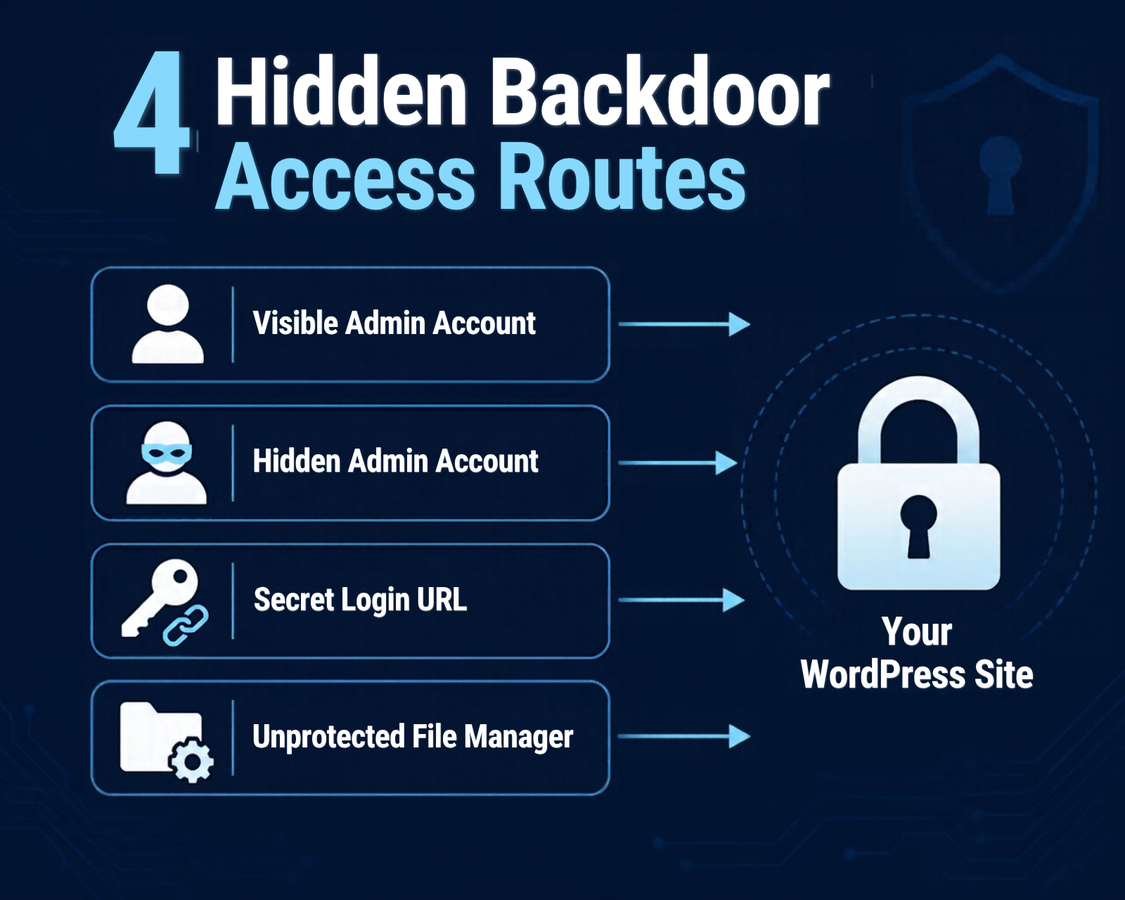
The four access routes this campaign builds into a compromised site, only one of which is removed by deleting the obviously fake plugin.
Frequently Asked Questions
Do I need to run Ninja Forms or WPC Product Bundles to be at risk?
No, but those are the two confirmed entry points as of this campaign’s disclosure. The underlying technique, a stored XSS bug that runs in front of a logged-in admin, works through any plugin with the same kind of flaw, and Patchstack expects more plugins to be added to the confirmed list over time.
Will updating the plugin remove an existing hidden admin account?
No. Updating Ninja Forms or WPC Product Bundles closes the entry point and stops new exploitation, but it does nothing to a hidden admin account, must-use plugin, or backdoor login URL that was already planted. You have to remove those separately, using the checklist and cleanup steps above.
How do I query the database directly for admin accounts if I’m not a developer?
Most hosting control panels include phpMyAdmin, which lets you browse the wp_users and wp_usermeta tables without writing SQL. If that feels out of reach, most WordPress security plugins include an “all administrators” view pulled from the database rather than the filtered admin interface, or your host’s support team can run the check for you.
Is this the same campaign as the WordPress 7.1.2 security release?
No, they’re unrelated. The WordPress 7.1.2 release patched a flaw in WordPress core itself. This hidden admin account campaign exploits vulnerabilities in two third-party plugins, Ninja Forms and WPC Product Bundles, that sit on top of a properly updated WordPress core. Both are worth taking seriously, but they require different fixes.
What if I don’t find any of the seven warning signs?
That’s a good sign, but not a guarantee, since Patchstack’s telemetry is limited. Update both plugins if you run them, and repeat the checklist periodically rather than treating it as a one-time pass.
A hidden WordPress admin account doesn’t announce itself; that’s the entire point of how this campaign was built. Two popular plugins, a stored XSS bug, and ten minutes of an administrator’s attention were enough to plant four separate ways back into a site. The good news is that every one of those four routes leaves a trace, and none of them are hard to check once you know where to look.
Your next action: open phpMyAdmin or your hosting file manager right now, compare your database’s administrator count against the Users screen, and glance inside wp-content/mu-plugins/. If you run Ninja Forms or WPC Product Bundles for WooCommerce, update both to their latest versions today, before you do anything else.

Leave a response