

A crawl budget audit checks whether Googlebot is spending its time on the pages that matter on your site, or burning it on duplicate filter combinations, stray parameters, and dead-end URLs. For most small sites this barely matters. For sites with thousands of category, filter, or tag pages, it decides which pages get found, refreshed, and ranked at all.
Google rewrote its official crawl budget documentation on July 22, 2026, and the update is a useful prompt to run this audit now, according to Search Engine Roundtable’s coverage of the change. The new wording confirms something a lot of site owners get wrong: every site starts with the same conservative crawl capacity limit, and Google raises it only when demand and server health justify it.
Below is a practical, step-by-step audit you can run on a WordPress site this week, built around what Google has actually published about crawling, faceted navigation, and URL parameters in 2025 and 2026.
What a Crawl Budget Audit Actually Checks
Google’s own documentation frames crawl budget as two separate things working together, explained in its crawl budget guide. A crawl budget audit has to check both.
Crawl capacity limit is how much server connection time Googlebot is willing to spend on your site. Google’s updated doc puts it plainly: “Every site starts with the same default, conservative crawl capacity limit.” Fast, stable responses can raise that ceiling over time. Slow responses, 5xx errors, or repeated HTTP 429 signals lower it.
Crawl demand is how much Googlebot wants to crawl, driven by perceived inventory, popularity, and staleness. Perceived inventory, meaning the sheer number of URLs Google thinks exist on your site, is the one site owners can control most directly, according to Google.
A proper crawl budget audit does not just look at server logs. It looks at why Google thinks your site has more URLs than it actually has useful pages, which is almost always a site architecture problem before it is a server problem.
Who actually needs this crawl budget audit
Google is explicit that this guidance targets specific site sizes: sites with over a million pages that change weekly, sites with over 10,000 pages that change daily, or any site with a large share of URLs stuck in “Discovered – currently not indexed.” If none of that describes your site, a full audit is still useful housekeeping, but it is not urgent.
- Check your sitemap or CMS page count against those thresholds
- Pull the “Discovered – currently not indexed” count from Search Console’s Page Indexing report
- If that number is large and growing, treat the audit as a priority, not a someday task
Step 1: Measure What Googlebot Is Actually Crawling
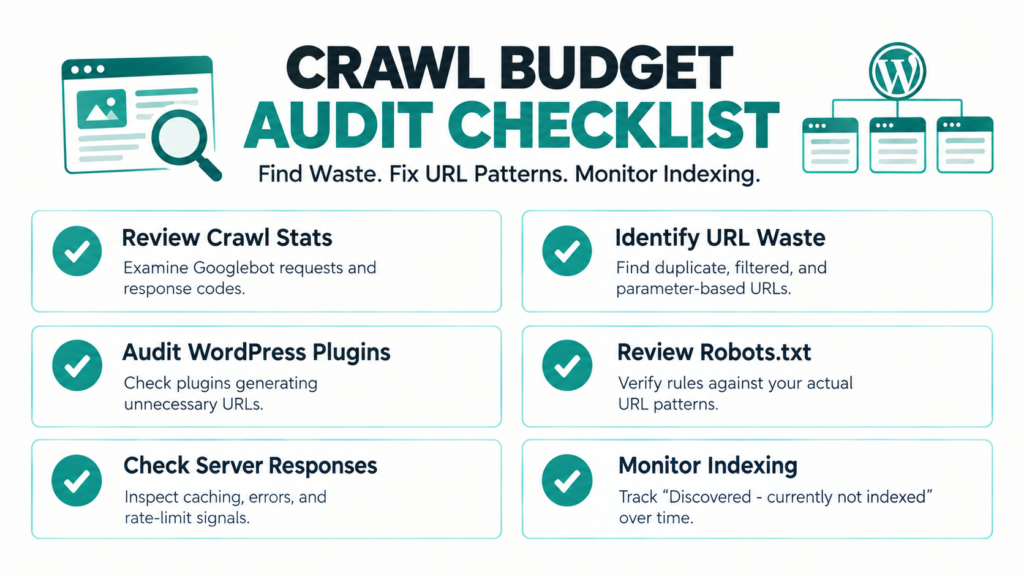
Before changing anything, find out where your crawl activity currently goes. Search Console’s Crawl Stats report, under Settings, breaks down requests by response code, file type, and purpose. Note that this data runs on a delay, a point we covered in detail in our piece on Google Search Console data delay, so treat it as directional rather than real-time.
If you have access to raw server logs, they’re more reliable. Filter for the Googlebot user agent and look at which URL patterns account for the most requests. On most mid-size WordPress sites with a filter or tag system, a small number of URL patterns account for a disproportionate share of hits.
Action steps:
- Export 30 to 90 days of Crawl Stats data by response code and file type
- Pull raw server logs filtered to Googlebot if your host or CDN supports it
- Group requested URLs by pattern (query string, path segment, post type) rather than reading them one by one
- Flag any pattern responsible for more than 10% of total crawl requests for closer review
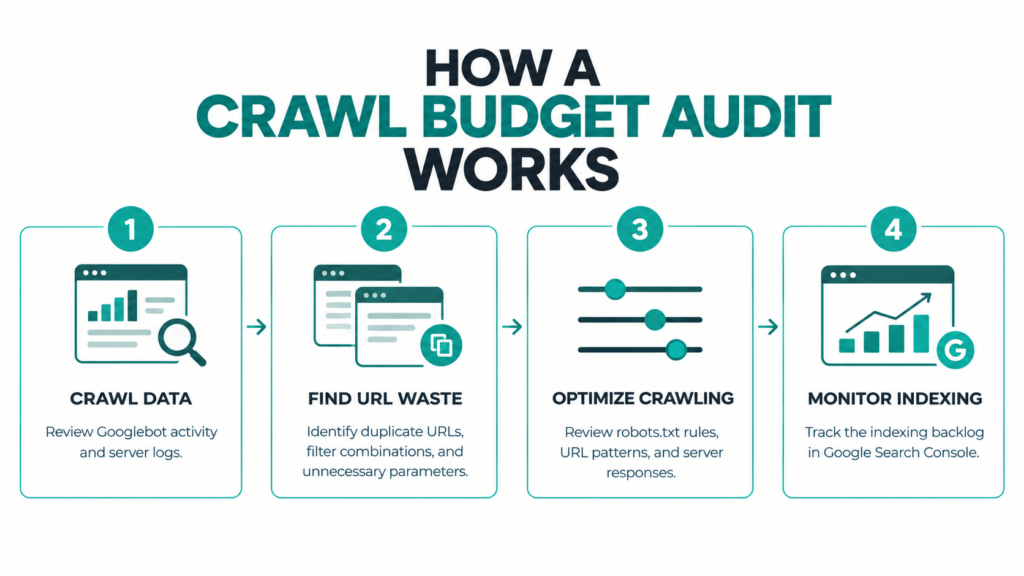
Step 2: Find Faceted Navigation Waste
Faceted navigation, the filter and sort controls on category, shop, or archive pages, is the single biggest source of crawl waste Google tracks. In a February 2026 episode of the Search Off the Record podcast, Google’s Gary Illyes reviewed the company’s internal 2025 year-end crawl issue report and said faceted navigation accounted for roughly half of all reported crawl problems, with action parameters like add-to-cart links making up another quarter, according to Search Engine Journal’s reporting on that episode. Together those two categories made up roughly three-quarters of the crawl issues Google flagged that year.
Google’s current official answer is its managing faceted navigation guide, which replaced a decade-old blog post in late 2024 and was folded into the main crawling documentation in December 2025. It lays out a clear split: block the facets that don’t need to be found, and standardize the ones that do.
For non-critical filters, meaning combinations nobody searches for, like sorting by price or a rarely used color swatch, Google recommends blocking them in robots.txt. Its documentation example looks like this:
Disallow: *?*products=
Disallow: *?*color=
Disallow: *?*size=
Allow: /*?products=all$
For facets you do want indexed, such as a genuinely popular category and color combination that gets search demand, Google’s guidance is to standardize the parameter format, always use the ampersand as the separator rather than commas or semicolons, keep filter order consistent, and return a real HTTP 404 for filter combinations that produce no results. Redirecting empty filter pages to a generic error page, instead of returning 404, keeps those dead URLs in Googlebot’s queue longer than necessary.
Action steps for this crawl budget audit:
- List every filter, sort, and facet parameter your theme or plugins generate
- Decide, facet by facet, whether it needs to be indexed at all
- Block non-critical facets in robots.txt rather than relying on canonical tags alone, since Google’s own guidance calls canonicals “generally less effective long term” for this purpose
- For facets you keep indexable, audit parameter order and separator consistency across the site
- Confirm empty filter combinations return a true 404, not a redirect to a generic page
Step 3: Audit WordPress Plugin-Generated URLs
This is the part of a crawl budget audit most generic SEO checklists skip, and it matters more on WordPress than almost any other platform. Illyes’s remarks, reported by Search Engine Journal, named WooCommerce specifically: its ?add_to_cart=true parameter was generating enough crawl waste that Google’s crawl team filed a bug directly against the plugin’s public repository. WooCommerce fixed it quickly once flagged. Illyes also mentioned an unnamed commercial calendar plugin that generates effectively infinite date-based URLs, where outreach to the developer went unanswered.
The underlying problem isn’t unique to those two plugins. Any plugin that appends action parameters to links, add-to-cart, add-to-wishlist, add-to-compare, quick-view modals, or calendar date paths, can multiply your real page count by a large factor without you ever creating those URLs on purpose. Illyes’s point about why this is hard to catch early is worth repeating: Googlebot often can’t tell a URL pattern is low-value “unless it crawled a large chunk of that URL space” first, meaning the damage is usually already underway before it becomes visible in Search Console.
Action steps:
- List every plugin on your site that adds links with query parameters, especially ecommerce, booking, calendar, and comparison plugins
- Check your server logs or Crawl Stats export for parameter patterns tied to those plugins
- Block action parameters you don’t need indexed in robots.txt rather than waiting for a crawl problem to surface
- If you maintain or contribute to an open-source plugin, check its issue tracker for existing crawl-related bug reports before assuming the problem is new
Step 4: Check Robots.txt Coverage Against Your Actual URL Space
A robots.txt file written two years ago rarely matches a site’s current URL space. New plugins, new taxonomies, and theme changes all add new parameter patterns that nobody goes back and blocks.
Pull your live robots.txt and compare it line by line against the URL patterns you identified in Steps 2 and 3. Also worth revisiting while you’re in there: if your URL formatting itself is inconsistent, with mixed casing, encoded characters, or inconsistent hyphenation, that compounds the parameter problem, a topic we cover separately in our URL structure SEO audit.
Action steps:
- Diff your current robots.txt against the parameter list from Steps 2 and 3
- Add disallow rules for any newly discovered low-value parameter pattern
- Test each new rule in Search Console’s robots.txt tester before deploying
- Re-check robots.txt coverage after any major plugin update or theme change
Step 5: Confirm Server Responses Aren’t Making the Problem Worse
Google’s July 2026 documentation rewrite put new emphasis on server health as a direct lever on your crawl capacity limit. Two specifics are worth checking as part of a crawl budget audit.
First, HTTP caching. Google’s updated guide recommends supporting 304 Not Modified responses, which let Googlebot confirm a page hasn’t changed without re-downloading the whole thing. Most WordPress caching plugins can do this, but it’s rarely verified directly.
Second, rate-limit signaling. Google’s crawling changelog added detail on the Retry-After header on October 6, 2026, as part of its guidance on urgently reducing crawler traffic, confirmed in the official Google crawling changelog. If your server is ever genuinely overloaded, returning a 503 or 429 with a proper Retry-After header tells Googlebot exactly when to come back, rather than leaving it to guess.
Action steps:
- Verify your server or CDN returns 304 responses for unchanged pages when Googlebot sends a conditional request
- Confirm your caching plugin isn’t stripping conditional-request headers
- If you ever need to throttle crawling in an emergency, use a real 503 or 429 response with a Retry-After header, not a robots.txt block, which Google’s own guidance says doesn’t free up budget for other pages
- Check the URL Inspection tool for a “Hostload exceeded” message, which signals your server itself is the bottleneck
Step 6: Watch the Indexing Backlog, Not Just the Crawl Log
A crawl budget audit isn’t finished once you’ve fixed URL patterns. The result shows up with a lag in the Page Indexing report, specifically in the “Discovered – currently not indexed” and “Crawled – currently not indexed” buckets. A shrinking backlog over several weeks is the clearest sign the audit worked. Keep in mind indexing itself can lag crawling by days even on a healthy site, something we go into in our guide to Google indexing time, so don’t expect the backlog to move overnight.
Action steps:
- Bookmark your current “Discovered – currently not indexed” count before making changes
- Re-check it every two to three weeks, not daily
- Treat a flat or shrinking trend as success, and a growing one as a sign new URL patterns have appeared somewhere
My take, after running through guidance like this on several WordPress sites with heavy filtering: the fixes themselves are rarely technically hard. Robots.txt rules, 404 handling, and parameter standardization are all a few hours of work. The harder part is simply knowing which URL patterns exist in the first place, since most of them come from plugins nobody thought to check.
FAQ: Crawl Budget Audit Questions
How often should I run a crawl budget audit?
Quarterly is reasonable for most large or filter-heavy sites. Re-run it immediately after adding a new ecommerce, booking, or calendar plugin, since Google’s own data points to those plugin categories as common sources of new crawl waste.
Does blocking URLs in robots.txt free up crawl budget for other pages?
Not automatically. Google’s documentation is specific on this: it reallocates budget elsewhere only once it is already hitting your crawl capacity limit. Blocking unimportant URLs still helps long term by reducing perceived inventory, but it isn’t an instant fix.
Should I use noindex or robots.txt for faceted navigation I don’t want crawled?
Robots.txt, for the URLs you’re sure add no value. Google still has to request a noindex page to see the tag, which wastes the same crawl time you’re trying to save.
Is crawl budget a ranking factor?
Not directly. The risk is indirect: pages that don’t get crawled or indexed can’t rank at all, regardless of quality. A crawl budget audit protects discoverability, not rankings themselves.
Why This Matters
Crawl budget problems are invisible until they aren’t. A site can run for years with messy faceted navigation and never notice, right up until the page count grows past the point where Googlebot’s conservative default capacity can keep up. Running this audit now, while the fixes are still a few robots.txt lines and some 404 handling, is considerably cheaper than discovering the problem through a stalled indexing backlog.
Start with Step 1 this week: pull your Crawl Stats export, find your biggest URL pattern, and decide whether it deserves Googlebot’s attention at all.




Leave a response