

Microsoft Advertising stopped letting advertisers add Max CPC to new non-portfolio Search campaigns on October 1, 2026. If you manage a Microsoft Ads account, the Microsoft Ads Max CPC removal changes how you set up campaigns using Target CPA, Target ROAS, Maximize Conversions, Maximize Conversion Value, or Maximize Clicks. This checklist walks through what to check in your account now that the cap is gone, so your bidding and budgets stay predictable.
What the Microsoft Ads Max CPC Removal Actually Changes
Max CPC was an optional ceiling you could set on automated bid strategies. It capped the most Microsoft Advertising would bid on a click, even while an algorithm tried to hit a conversion or revenue goal.
Microsoft emailed advertisers around August 20, 2026, saying that option was going away for new campaigns. Search Engine Journal reported that the original notice covered three strategies: Maximize Conversions, Maximize Conversion Value, and Maximize Clicks. A follow-up email in early September added Target CPA and Target ROAS to the list, according to Search Engine Land’s coverage of that update. By October 1, all five non-portfolio strategies lost the Max CPC option in the campaign creation screen.
Navah Hopkins, Microsoft’s Ads Liaison, explained the reasoning on LinkedIn, and Search Engine Land quoted her saying Max CPC caps “override stated goals and can lead to spend pacing irregularities.” Microsoft’s advertiser email, quoted by both outlets, put it plainly: “Max CPC will no longer be available when creating new non-portfolio campaigns.”
Microsoft’s recommended replacements are budgets, Target CPA and Target ROAS goals set correctly from the start, conversion value rules, and seasonality adjustments for known demand spikes. Hopkins also suggested testing a campaign without Max CPC through Microsoft’s Search optimization experiments before you commit real budget to it.
Here is how Max CPC worked before this change, for context. You picked an automated bid strategy, such as Maximize Conversions, and then entered a dollar amount as a hard ceiling. The algorithm could bid anywhere up to that number on a given click but never above it, no matter how strong the conversion signal looked. That made it a blunt instrument. It was useful as a guardrail against a runaway auction. But it could also block the algorithm from bidding on a click that would have converted well, simply because the price crossed a line you set months earlier and never revisited.
Why Microsoft Says It’s Making This Change
Hopkins’ explanation, reported across multiple outlets, is that a fixed Max CPC value becomes stale fast. A cap set when average CPCs were lower can quietly throttle a campaign’s reach once the auction shifts, and most advertisers never go back to adjust it. The pacing issue Hopkins described happens when the algorithm wants to spend the daily budget but keeps hitting the price ceiling on the clicks most likely to convert, so budget goes unspent or shifts toward lower-quality clicks instead.
This fits a pattern Microsoft Advertising has followed for a while now. It keeps narrowing the manual override switches inside automated bid strategies, on the theory that most accounts set those overrides once and never revisit them. The same logic drove Microsoft’s 2025 consolidation of Target CPA and Target ROAS settings. Whether that trade-off is worth it depends heavily on how reliable your own conversion data is, which is exactly why the checklist below starts with an audit rather than a rebuild.
Who Is Affected by the Microsoft Ads Max CPC Removal
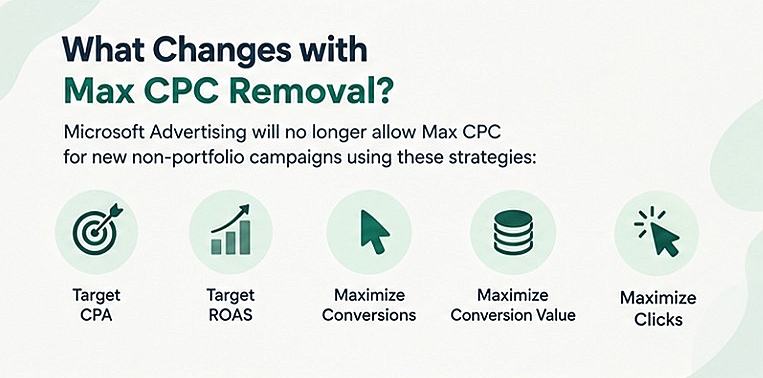
Not every campaign loses access to the cap. Here is the breakdown reported across multiple trade outlets, including PPC Land and Search Engine Roundtable:
- New standalone (non-portfolio) campaigns created on or after October 1, 2026, using Target CPA, Target ROAS, Maximize Conversions, Maximize Conversion Value, or Maximize Clicks can no longer have Max CPC added at creation.
- Campaigns created before October 1 that already use Max CPC keep it. Microsoft has not said whether it will remove the cap from those later.
- Portfolio bid strategies, for both new and existing campaigns, keep the Max CPC option.
- Enhanced CPC and Target Impression Share are untouched by this change.
- Removing Max CPC from a campaign after the fact is a one-way action. You cannot add it back once it is gone.
- Microsoft told advertisers that the user interface changes first. Removal from Microsoft Advertising Editor and bulk upload has no confirmed date. An API update is expected to follow by January 12, 2027, per Search Engine Land’s reporting on Microsoft’s email to API users and tool providers.
The 9-Point Microsoft Ads Max CPC Removal Checklist
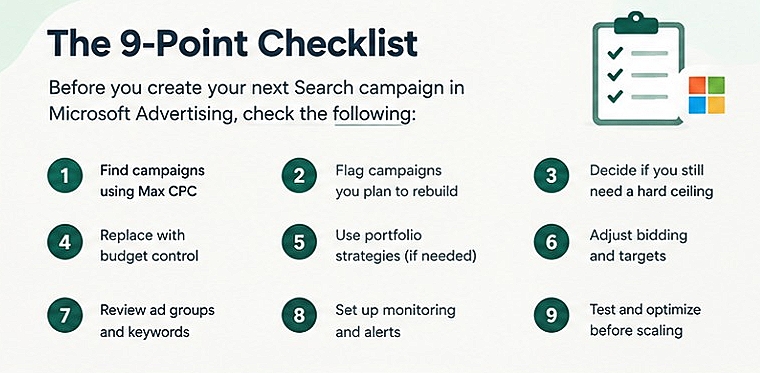
Run through these nine checks before you build your next Search campaign in Microsoft Advertising.
1. Find every campaign that still uses Max CPC
Open each account and filter campaigns by bid strategy. Note which ones have a Max CPC value set. These are the campaigns you can still edit freely, but only until you remove that setting.
2. Flag campaigns you were planning to rebuild
If you had a plan to duplicate, pause-and-recreate, or restructure any Search campaign after October 1, check whether that plan assumed a Max CPC cap. You will need a different control now.
3. Decide if you still need a hard ceiling
If a cap matters to your account (for example, a client who wants spend capped regardless of conversion opportunity), look at moving that strategy into a portfolio bid strategy. Portfolio strategies still support Max CPC for new and existing campaigns.
4. Replace the cap with budget-level control
Daily and campaign budgets still work as a backstop even without Max CPC. Set budgets tighter than you might have before, and monitor spend more often during the first few weeks of a new campaign.
5. Tighten your Target CPA and Target ROAS inputs
Without a bid ceiling, your automated bidding leans harder on the accuracy of your Target CPA or Target ROAS value. Review your historical conversion data before setting these goals on a new campaign, rather than guessing.
6. Add conversion value rules and seasonality adjustments
Microsoft specifically recommends conversion value rules and seasonality adjustments as substitutes for Max CPC. Use them to tell the algorithm about known demand changes, like a sale period or a seasonal spike, instead of relying on a bid cap to control cost during those windows.
7. Confirm your conversion tracking is solid first
Automated bidding without a Max CPC cap depends even more on clean conversion data. Before building new campaigns under the new rules, make sure your account’s conversion tracking is set up correctly, including how you track key events and conversions in GA4 if that is where your source-of-truth data lives.
8. Test with Search optimization experiments before going live
Rather than switching an entire account cold, run Microsoft’s Search optimization experiments on a subset of traffic first. Compare performance with and without a Max CPC-style cap using the controls above, and only roll the change out account-wide once you see stable pacing.
9. Write a short internal playbook for campaign creation
Document the new default setup for your team: which bid strategy to use, what budget to start with, and which conversion value rules apply. This keeps account managers from hunting for a Max CPC field that no longer exists on new campaigns, and keeps new campaign setup consistent across your team.
Quick action list:
- Pull a bid-strategy report across all active Microsoft Ads accounts you manage.
- Mark which live campaigns still have Max CPC and leave those alone if they’re performing well.
- Build one test campaign without Max CPC using a portfolio strategy as a fallback plan.
- Update your campaign build checklist or SOP before your next launch.
Example Scenario: Auditing a Mid-Size Search Account
Picture a Microsoft Ads account running 40 Search campaigns, split between lead generation and ecommerce. Fifteen of those campaigns use Maximize Conversions with a Max CPC cap set months ago, mostly as a safety net against a bad landing page test.
After the Microsoft Ads Max CPC removal, the account manager pulls a bid strategy report and finds those 15 campaigns are untouched since they predate October 1. Three new campaigns were on the roadmap for November, all planned around Target CPA goals with a Max CPC ceiling as backup.
Instead, the manager moves one of those three into a portfolio bid strategy shared with two other stable campaigns, so it keeps a cap. The other two launch without one, using tighter daily budgets and a conversion value rule tied to a planned promotion. The team watches daily spend for the first two weeks rather than checking in weekly, since pacing is the main risk Hopkins flagged. That single change, checking bid strategy reports before any new build, turns an abstract policy update into a two-hour task.
Limits and Open Questions on the Max CPC Change
A few things are still unclear, and worth tracking rather than guessing at.
Microsoft has not announced an automatic migration path for existing Max CPC campaigns, unlike the conversion it ran when it consolidated Target CPA and Target ROAS bidding in 2025. If Microsoft later decides to extend the removal to existing campaigns, there is no precedent yet for how that transition would work.
The exact date for removing Max CPC from Microsoft Advertising Editor and bulk upload has not been confirmed. The API deadline reported for tool providers and Google Import is January 12, 2027, but that is a compliance deadline for third-party tools, not necessarily the date Max CPC disappears from every interface.
It also is not clear whether running a Search optimization experiment on an existing campaign counts as creating a “new” campaign for this rule. If your workflow relies heavily on experiments to test bid strategy changes, confirm this with Microsoft Advertising support before assuming experiment campaigns are exempt.
Frequently Asked Questions
Does the Max CPC removal affect Google Ads too?
No. This change is specific to Microsoft Advertising. Google Ads is tightening its own automated controls in separate, unrelated updates, so check platform-specific coverage before assuming a Microsoft Ads change applies to Google Ads campaigns.
Can I still add a Max CPC cap to a new campaign after October 1?
Only by building it as part of a portfolio bid strategy. Standalone, non-portfolio campaigns using the five affected bid strategies no longer show the option at creation.
What happens to campaigns that already have Max CPC set?
They keep the setting as-is. Microsoft has not said it will strip Max CPC from existing campaigns, but removing it yourself is irreversible, so leave it in place unless you have a specific reason to change it.
What should I use instead of a Max CPC cap?
Microsoft recommends budgets, accurate Target CPA or Target ROAS goals, conversion value rules, and seasonality adjustments. Pair those with tighter monitoring during the first few weeks of a new campaign.
Does this apply the same way if I run ads through an agency or Google Import?
Third-party tools and Google Import are covered by a separate compliance deadline, reported as January 12, 2027. Ask your agency or tool provider directly whether their workflow has already been updated to match the new rules.
Will this change hurt my account’s performance right away?
Not necessarily. The risk Hopkins flagged is pacing irregularity, meaning spend that pulls back or shifts unexpectedly, not a guaranteed drop in results. Accounts with solid conversion tracking and realistic Target CPA or Target ROAS goals are the least likely to notice a difference.
Should I remove Max CPC from campaigns that still have it?
Not automatically. Since removing it is irreversible, only take it off a working campaign if you have a specific reason, such as suspected pacing problems or a plan to fold that campaign into a portfolio strategy anyway.
Why This Matters
Microsoft Advertising is pushing more of the account toward goal-based automated bidding and away from manual safety nets. That is a reasonable direction if your conversion tracking and budgets are solid, but it shifts more risk onto those two areas if they are not. In my experience, the accounts that handle a change like this cleanly are the ones that already monitor pacing closely, not the ones that scramble after the fact.
This is also a reminder that bid strategy settings are not “set and forget,” even on platforms that automate most of the decision-making. A cap you set a year ago, under different market conditions, can quietly work against you long before Microsoft decides to remove the option entirely.
What To Do Next
Run the bid-strategy audit in this checklist this week, even if you have no new campaigns planned. Knowing exactly which campaigns still carry a Max CPC cap, and which ones will need a different safety net going forward, is the groundwork for every other step here.
A few concrete next steps:
- Export a bid-strategy report for every Microsoft Ads account you touch, today.
- Draft the internal playbook update before your next campaign launch, not after.
- Set a calendar reminder to check Microsoft’s API and Editor documentation again before January 12, 2027, since that deadline affects anyone using third-party tools or Google Import.
- If you also run paid search on other platforms, keep an eye on how Google Ads’ AI-driven bidding and asset tools are evolving in parallel, since the two platforms don’t always move in lockstep.




Leave a response