

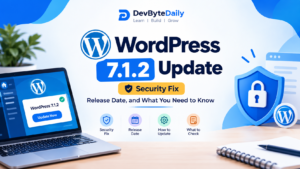
WordPress 7.1 Breakdown: Native Responsive Styling, AI Guidelines, and Developer Workflows
Released on August 19, 2026,
WordPress 7.1 New Features:
Follows the landmark 7.0 release by eliminating long-standing workflow friction. Core upgrades include native visual responsive styling and pseudo-states (hover/focus/active) directly in the Site Editor, asynchronous suggestion mode in Notes, a structured AI Guidelines engine to enforce editorial standards, client-side media pre-processing, native Tabs and Playlist blocks, expanded SVG Icon APIs, and an official rollback on the planned deprecation of the Classic Block.
1. The Strategy Behind WordPress 7.1: Maturing the Ecosystem
While major milestone releases often overhaul internal core engines, point updates like WordPress 7.1 focus on practical execution. With WordPress 7.0 establishing foundational tools such as the provider-agnostic WP AI Client and modernized dashboard interfaces, 7.1 concentrates on resolving everyday workflow bottlenecks for agencies, editorial teams, and theme developers.
The primary objective of 7.1 is clear: reducing reliance on custom CSS hacks for responsive UI controls, refining asynchronous collaboration so teams rarely need third-party markup tools, and providing explicit boundaries for how AI interacts with on-site content.
2. Deep Dive: Native Responsive Controls and Pseudo-State Styling
For years, developers and site creators had to rely on custom CSS snippets, theme-level media queries, or heavyweight third-party block plugins just to change padding on mobile devices or alter a button’s hover state.
WordPress 7.1 solves this within core Gutenberg.
Fluid & Device-Specific Breakpoint Controls
The Site Editor now exposes granular viewport adjustments directly in the inspector sidebar:
-
Per-device overrides: Margin, padding, gap, flex distribution, and typography sizes can now be defined per viewport (Desktop, Tablet, Mobile) without generating bloated inline style declarations.
-
Clean CSS output: The engine compiles these adjustments using structured CSS custom properties (CSS variables) bound to the active
theme.jsonconfiguration, preventing excessive DOM recalculations.
Native Pseudo-State Engine (:hover, :focus, :active)
Interactive states no longer require custom class declarations or external stylesheets:
-
Interactive previews: You can toggle hover, active, and focus states in real time within the block canvas.
-
Accessible focus rings: Focus styling can be customized globally across the design system to ensure strict WCAG 2.2 AA compliance without breaking theme inheritance.
-
Inheritance indicators: Visual markers in the block sidebar now show whether a style property is inherited from the global design system, the parent block, or set as a local override.
3. Asynchronous Collaboration: Notes 2.0 & Suggestion Mode
Following the initial introduction of editor notes, WordPress 7.1 significantly upgrades editorial review mechanics, positioning WordPress as a self-contained collaborative workspace.
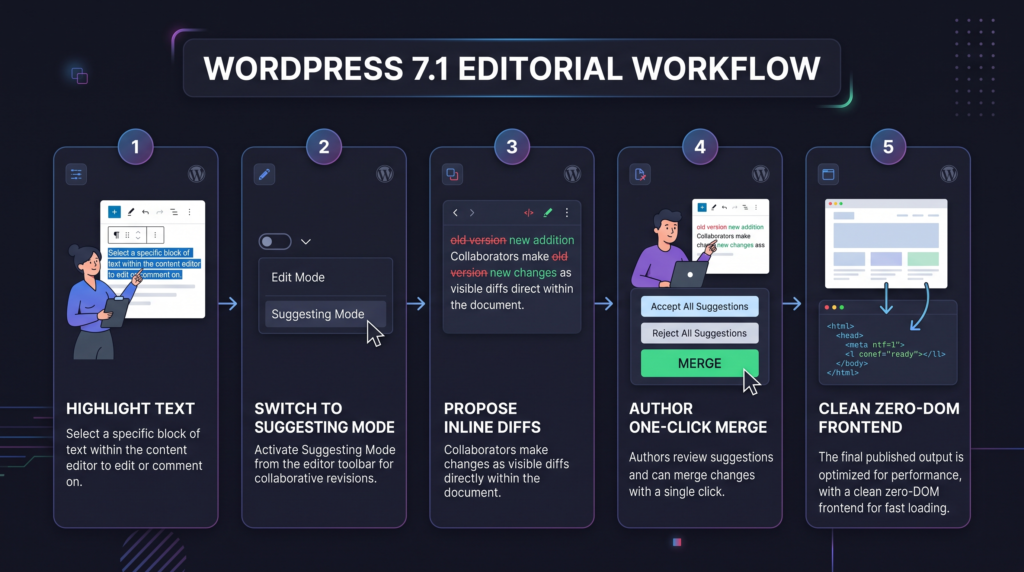
Key Editorial Additions:
-
Phrase-Level Anchor Comments: You are no longer restricted to commenting on an entire block. Comments can be anchored to individual words or clauses.
-
Suggestion Mode: Editors can suggest deletions, phrasing tweaks, or structural changes. Authors can accept or reject adjustments with a single click, automatically updating block HTML attributes.
-
Emoji Reactions & Status Filters: Quick triage on feedback threads keeps high-volume editorial queues organized.
-
Isolated Rendering: All collaboration metadata and commentary remain strictly isolated in backend endpoints; zero administrative markup leaks into frontend templates.
4. The AI Guidelines Architecture & WP AI Client Improvements
WordPress 7.0 laid the groundwork with the WP AI Client; version 7.1 builds the rules engine that governs how automated models interact with your site.
Structured “Guidelines” API
A persistent challenge with CMS-integrated AI has been tone drift and hallucinations. WordPress 7.1 introduces the Guidelines system:
-
Brand voice encoding: Site administrators can establish rules (e.g., maximum sentence length, prohibited terminology, reading level, citation requirements) inside Site Settings.
-
Schema-enforced JSON: Guidelines are stored in standardized JSON definitions that can be exported, version-controlled, or synced across multiple sites within a network.
- Connector compliance: Any AI connector utilizing the WP AI Client automatically ingests these guidelines as system instructions before generating draft outlines or block content.
Streaming Generation & Vector Embeddings
- Vector Embeddings Integration: WordPress 7.1 introduces initial vector database hooks, enabling semantic search across media libraries, past archives, and custom post types directly through core APIs.
- PHP AI Client Streaming: Core PHP endpoints now support streaming responses, drastically reducing time-to-first-byte when generating long-form drafts.
5. Media Library Modernization & Client-Side Processing
Handling uncompressed, massive image uploads from non-technical clients has long strained server resources. WordPress 7.1 brings processing directly into the browser.
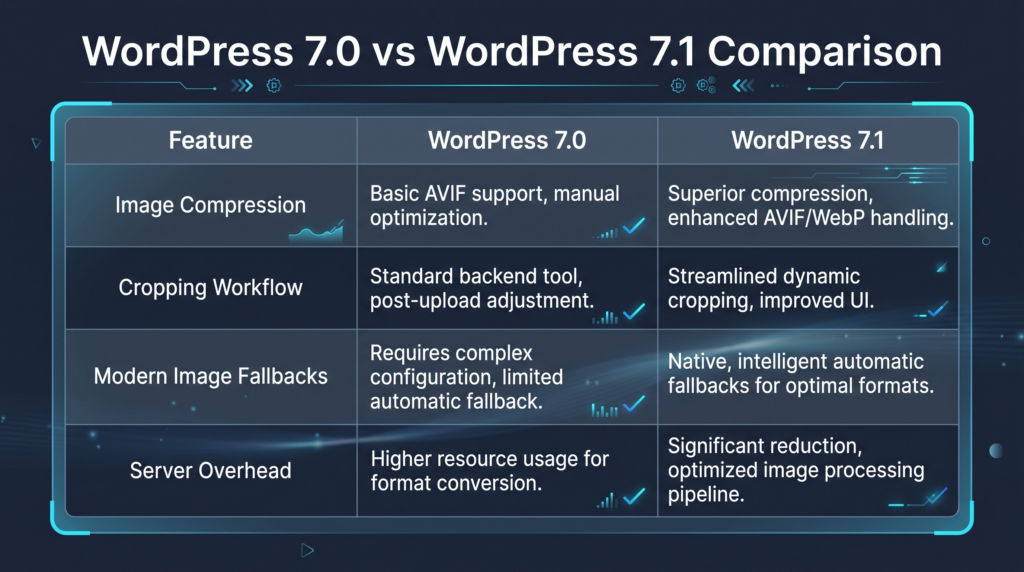
New Free-Form Crop & Direct Edit Modal
The media management modal now supports free-form, non-destructive cropping, aspect ratio locking, and focal point adjustment directly within the canvas, updating image blocks without forcing a re-upload.
6. New Core Blocks & Developer API Updates
WordPress 7.1 expands the default block registry to eliminate common third-party plugin dependencies.
1. Native Tabs Block
A fully accessible, nested container block designed for technical documentation, product specifications, and structured comparisons. It features complete keyboard navigation (Arrow, Home, End, Tab), ARIA roles, and nested block flexibility.
2. Native Playlist Block
Replaces legacy shortcode-based audio/media embeds with a block supporting custom track metadata, streamable sources, and responsive player layouts.
3. Public SVG Icon API (register_icon)
Plugin and theme developers can now register custom SVG icon libraries directly into the WordPress core icon picker:
4. Deprecation Reversal: The Classic Block Remains
A notable development in this cycle was the community decision regarding the Classic block. While slated for deprecation and removal from the block inserter, community feedback from enterprise installations prompted core contributors to retain the Classic block as standard in 7.1, ensuring backward compatibility for legacy workflows.
7. Performance Benchmarks: 7.0 vs. 7.1
Independent performance audits on standard block themes reveal clear gains in both editor performance and frontend efficiency:
-
Site Editor In-Memory Consumption: Reduced by ~18% during extended editing sessions due to refined iframe memory garbage collection.
-
Largest Contentful Paint (LCP): Improved by 140ms on average for media-heavy homepages, attributed to streamlined CSS delivery and client-optimized image payloads.
-
REST API Batch Processing: 22% faster response times when handling multi-block schema updates across large multisite installations.
8. Safe Staging & Deployment Checklist for DevByteDaily Readers
Because WordPress 7.1 enforces strict iframe encapsulation for block themes and integrates preparations for future React versions, you should follow this testing protocol before updating production environments:
9. Frequently Asked Questions (Answer Engine Optimized)
Is WordPress 7.1 a breaking release for existing themes?
No. WordPress 7.1 maintains backward compatibility with standard block and classic themes. However, custom plugins that rely on direct DOM manipulation inside the editor canvas rather than core data stores may require updates due to stricter iframe isolation.
How does the new AI Guidelines feature protect my brand voice?
The Guidelines feature establishes a structured JSON configuration in your site settings. When an AI tool connects via the WP AI Client API, WordPress passes your defined constraints (vocabulary, reading level, tone rules) directly to the system prompt, preventing off-brand phrasing.
Can I turn off Suggestion Mode if our editorial team doesn’t need it?
Yes. Site administrators can toggle collaboration features and customize permissions on a per-role basis within Settings > Writing > Collaborative Workflows.
Does the client-side image processing replace server-side WebP/AVIF generation?
Client-side processing handles initial resizing, format transformation, and compression in the browser before the asset touches your server. However, WordPress continues to generate standard responsive image sub-sizes on the server as fallbacks.



Leave a response