

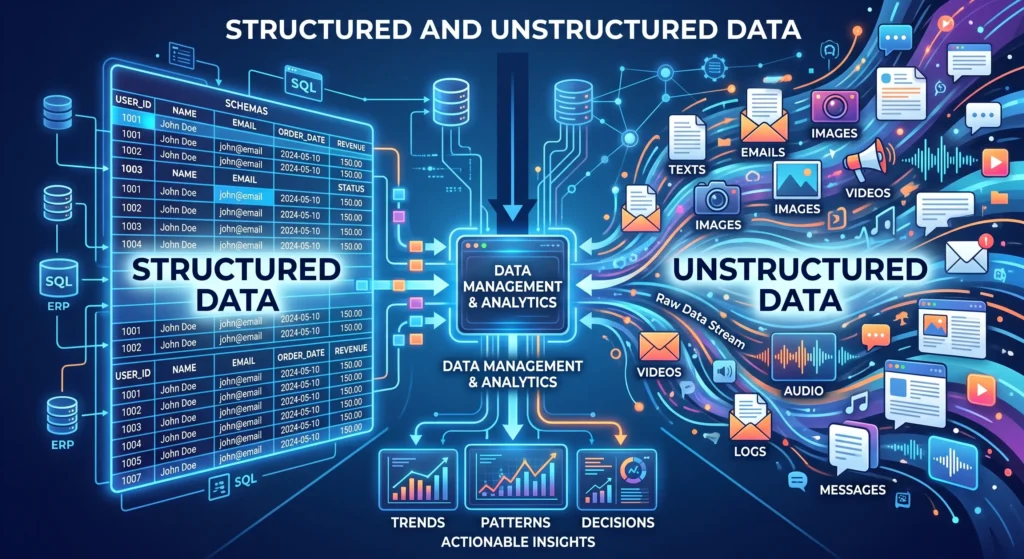
Understanding structured and unstructured data is important if you work with websites, SEO, analytics, databases, or digital content. Businesses generate huge amounts of information every day, but not all of it is stored or organized the same way.
Some data fits neatly into rows, columns, and predefined fields. Other information comes as blog posts, images, videos, emails, customer comments, and documents that don’t follow a fixed structure.
This is where the difference between structured and unstructured data becomes important.
Structured data follows a defined format that makes it easier for systems to store, search, analyze, and process. Unstructured data is more flexible and can contain information that doesn’t fit naturally into a traditional database.
For SEO professionals, there is another important use of the term. Structured data SEO refers to machine-readable markup that helps search engines understand the content and entities on a webpage. Google describes structured data as a standardized format for providing information about a page and classifying its content.
In this guide, we’ll explain what structured data is, how it differs from unstructured data, explore practical structured data SEO examples, and look at the tools you can use as a structured data validator or structured data testing tool.
What Is Structured Data?
Structured data is information that follows a predefined format or schema. Each piece of information has a specific place and meaning, which makes it easier for computers and software systems to process.
A simple customer database is a good example.
A company might store customer information using fields such as:
- Customer name
- Email address
- Phone number
- Customer ID
- City
- Purchase date
- Order value
Because each field has a defined purpose, the company can easily search the database, filter customers, generate reports, or connect the information with another system.
Spreadsheets are another familiar example of structured data. If you have a spreadsheet containing product names, SKUs, prices, and inventory quantities, each column represents a particular type of information.
The same principle applies to relational databases.
Relational Databases and Structured Data
Relational databases are a foundational part of structured data storage. They organize information into tables and use defined relationships between those tables.
Popular relational database systems include MySQL, Oracle Database, and Microsoft SQL Server.
For example, an e-commerce company could have one table containing customers and another containing orders. A customer ID can connect the two tables, allowing the business to determine which orders belong to which customer.
This structure makes it possible to run precise queries and handle large volumes of information efficiently.
Structured databases are commonly used for:
- Customer management
- Inventory systems
- Financial records
- Order processing
- Employee records
- Sales reporting
- Business analytics
- CRM systems
The important point is that structured data follows rules. Those rules make the information predictable and easier for software to work with.
Examples of Structured Data
You probably interact with structured data more often than you realize.
Here are some common examples:
Product or Customer Directories
A product database might contain a product name, SKU, category, price, stock quantity, and supplier ID.
A customer directory could contain names, phone numbers, email addresses, locations, and customer IDs.
Inventory Tracking Sheets
An inventory spreadsheet can contain:
| Product | SKU | Quantity | Price |
|---|---|---|---|
| Laptop Stand | LS-102 | 45 | $39 |
| Wireless Mouse | WM-205 | 120 | $25 |
| USB Hub | UH-310 | 68 | $18 |
Each value has a specific field and purpose, making the information easy to sort and analyze.
Web Form Results
When someone submits a contact form, the information may be stored in predefined fields such as name, email, phone number, and message.
The name and contact details are structured fields, while the free-text message itself may be unstructured.
Point-of-Sale Data
Retail systems collect structured information such as product IDs, quantities, prices, transaction dates, payment methods, and store locations.
Financial Records
Bank transactions, invoices, payroll records, tax information, and accounting data are commonly stored using predefined fields.
Benefits of Structured Data
Using structured data comes with several practical advantages. Its biggest strength is predictability: because the information follows a defined format, systems can work with it consistently.
Simplifies Data Querying and Reporting
Structured data makes it easier to find specific information.
For example, a business can query its database to find all customers who purchased a particular product during the previous 30 days.
Instead of manually reviewing thousands of records, a database query can return the relevant information almost instantly.
The same structure also makes reporting easier. Sales teams can generate reports based on revenue, location, product category, customer type, or other predefined fields.
Supports Analytics and Business Insights
Structured data provides a strong foundation for analytics and business intelligence.
A company can use historical sales data to identify trends, compare product performance, analyze customer behavior, or forecast future demand.
For example, an e-commerce business could compare monthly sales data to determine which product categories are growing and which ones are declining.
Because the data is organized consistently, analytical tools can process it more efficiently.
Improves Data Accuracy and Consistency
A predefined schema can help reduce errors.
For example, a database might require a phone number field to contain a specific number of digits. A price field might only accept numerical values, while a date field follows a particular format.
These rules don’t eliminate every possible data-quality problem, but they can prevent many common input errors.
This consistency becomes especially important when multiple systems depend on the same information.
Integrates With Other Systems
Structured data can be easier to transfer between applications because both systems know what each field represents.
For example, customer information stored in a database can be connected with a CRM, email marketing platform, accounting system, or analytics platform.
This type of interoperability can reduce manual data entry and make business processes more efficient.
Structured Data Challenges
Structured data is useful, but it isn’t the right format for every type of information.
Its biggest limitation is that it works best when information can be clearly defined in advance.
Limited to Predefined Formats
Structured systems require you to decide what fields and data types you need.
That works well for information such as product prices or customer IDs, but it becomes more difficult when dealing with free-form information.
A customer review, for example, might contain several different ideas in a single paragraph.
Trying to force every part of that review into predefined database fields can be impractical.
Less Flexible for Multimedia Content
Images, videos, audio recordings, documents, and natural-language conversations don’t naturally fit into simple rows and columns.
A database can store a reference to a video or image, but understanding the actual content inside that media is a different challenge.
This is one reason modern data environments often combine structured, unstructured, and semi-structured information.
Large-Scale Systems Can Become Complex
Structured databases can scale to very large workloads, but scaling isn’t always as simple as adding more rows.
As data volume, queries, users, and relationships increase, organizations may need additional infrastructure, indexing, partitioning, distributed databases, caching, or other optimization techniques.
So it would be inaccurate to say that structured data simply “can’t scale.” Relational databases can handle enormous workloads. The challenge is choosing the right architecture for the workload.
Provides Limited Context on Its Own
Structured data can tell you that a customer purchased a product, when they purchased it, and how much they paid.
It doesn’t necessarily tell you why they liked the product, what they wrote about it online, or what they said in a video review.
That information may exist in unstructured or semi-structured sources.
This is where the distinction between structured and unstructured information becomes particularly useful.
What Is Unstructured Data?
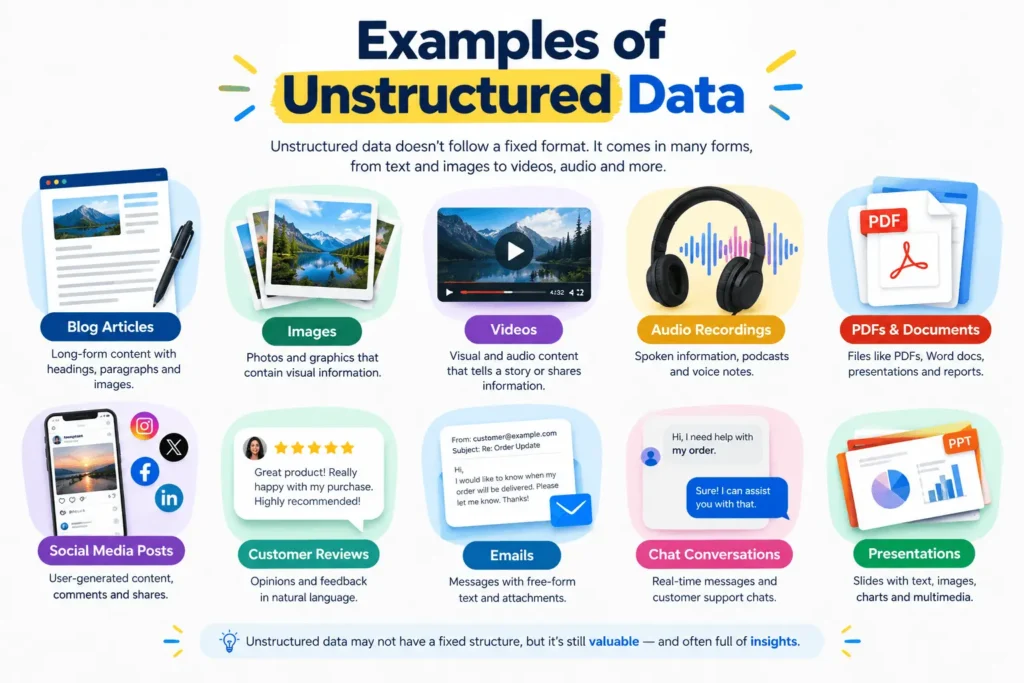
Unstructured data is information that doesn’t follow a fixed schema or predefined table structure.
Instead of fitting neatly into rows and columns, it can exist as natural language, multimedia, documents, or other flexible formats.
Common examples include:
- Blog articles
- Emails
- Images
- Videos
- Audio recordings
- PDFs
- Social media posts
- Customer reviews
- Chat conversations
- Voice recordings
- Presentations
Consider a customer review that says:
“I bought this laptop stand last month. The build quality is excellent, but I wish it had a wider base.”
There is useful information inside that sentence, including the product experience and customer sentiment. However, the information isn’t presented as separate database fields.
A person can understand the meaning immediately. A computer system may need additional processing to extract that meaning.
This is where technologies such as natural language processing, machine learning, computer vision, and AI become useful.
Examples of Unstructured Data
Blog Posts
A blog article contains headings, paragraphs, lists, images, and other elements. Although the page has some HTML structure, the actual information inside the text is largely natural language.
Images and Videos
A product photograph contains visual information that isn’t naturally represented as rows and columns.
Similarly, a product demonstration video may contain spoken words, movement, objects, and other information.
Customer Reviews
Reviews are particularly valuable because customers can express opinions in their own words.
One review might discuss price, another might focus on quality, and another might describe a delivery experience.
Emails and Chat Messages
Business communication often contains valuable information, but the content isn’t necessarily stored in a fixed schema.
For example, a customer may explain a problem in several sentences rather than selecting predefined options.
Structured and Unstructured Data
Structured and unstructured data serve different purposes.
Structured data works well when information needs to be organized into predictable fields. Unstructured data works better when people need flexibility to communicate or store information without being restricted by a predefined schema.
In practice, businesses often use both.
Consider an e-commerce product page.
The product may have:
- Product name → structured
- SKU → structured
- Price → structured
- Stock status → structured
- Product description → largely unstructured
- Product images → unstructured
- Customer reviews → largely unstructured
- Product schema markup → structured machine-readable information
This combination is common across modern websites.
What Is the Difference Between Structured and Unstructured Data?
The simplest way to understand the difference is to look at how the information is organized.
| Feature | Structured Data | Unstructured Data |
|---|---|---|
| Organization | Predefined | Flexible |
| Format | Tables, fields, schemas | Text, images, audio, video |
| Querying | Relatively straightforward | More complex |
| Data types | Clearly defined | Diverse |
| Examples | Database, spreadsheet | Article, image, video |
| Analysis | Easier with traditional tools | Often requires additional processing |
| Flexibility | Lower | Higher |
| SEO example | Schema markup | Page content |
Neither type is automatically better.
A financial transaction needs clearly defined fields. A customer review needs the freedom to express an opinion naturally.
The right approach depends on what you are trying to store, understand, or analyze.
Structured vs Unstructured Data
When comparing structured vs unstructured data, it helps to think about a database and a document.
A database might tell you:
Customer: Sarah
Product: Running Shoes
Price: $120
Purchase Date: September 10
A customer review might say:
“I’ve used these shoes for several weeks and they’re comfortable for long walks, although the sizing feels slightly smaller than expected.”
The first example is easy to query because every piece of information has a predefined field.
The second contains richer context, but extracting specific information from it requires understanding the language.
That is the fundamental trade-off: structured data offers consistency, while unstructured data offers flexibility and context.
Structured Data SEO Examples
The term structured data has a specific meaning in SEO.
On a webpage, structured data can provide search engines with machine-readable information about the content and entities on that page.
Google supports structured-data features for several types of content, including articles, products, events, organizations, recipes, local businesses, and other supported search features.
Article Structured Data
Article markup can help Google understand details about an article, such as its headline, author, image, and publication or modification dates. Google documents Article, NewsArticle, and BlogPosting as Schema.org types that can be used for article pages.
For a blog, this can provide clearer machine-readable context about the page.
Product Structured Data
Product structured data is particularly useful for ecommerce websites.
It can describe information such as:
- Product name
- Product image
- Price
- Availability
- Reviews
- Ratings
This gives search engines more explicit information about the product represented on the page.
Organization Structured Data
Organization markup can help describe an organization and provide structured information about the entity represented by the website.
This can be useful for businesses, brands, companies, and other organizations.
Local Business Structured Data
Local businesses can use appropriate structured data to communicate information about their business to search engines.
This can include details such as business type, location, opening hours, and other applicable properties.
Breadcrumb Structured Data
Breadcrumb markup helps describe the hierarchy of a webpage within a website.
For example:
Home → SEO → Technical SEO → Structured Data
This provides a clearer representation of where a page sits within the site’s structure.
Does Structured Data Improve SEO?
Structured data can help search engines better understand page content and can make eligible pages available for certain enhanced search features.
However, there is an important distinction to remember:
Adding structured data does not guarantee higher rankings or a rich result.
Google explicitly states that correctly implemented structured data does not guarantee that the corresponding search feature will appear. Eligibility depends on Google’s systems and the applicable requirements.
So schema markup should be treated as a way to provide clearer information about your content, not as a guaranteed ranking shortcut.
Structured Data Validator
A structured data validator helps you check whether your markup is implemented correctly.
There are two tools worth knowing about because they serve slightly different purposes.
Google Rich Results Test
Google’s Rich Results Test is useful when you want to check whether your structured data can support Google’s eligible rich-result features.
Google recommends validating structured data with the Rich Results Test and fixing critical errors before deployment. It also recommends checking the published URL with Search Console’s URL Inspection tool to see how Google accesses the page.
You can use the tool here:
Schema Markup Validator
The Schema Markup Validator focuses on Schema.org markup itself.
It can extract JSON-LD, RDFa, and Microdata and identify syntax problems in the markup.
You can test your markup here:
These tools shouldn’t be treated as identical. The Rich Results Test is particularly useful for Google’s supported rich-result features, while the Schema Markup Validator focuses on Schema.org markup.
Structured Data Testing Tool: How to Test Your Website
If you are looking for a structured data testing tool, you can follow a simple workflow.
Step 1: Add Appropriate Schema Markup
Choose structured data that accurately represents the content on your page.
For example, don’t use Product schema on a general SEO article simply because you want additional search features.
Step 2: Test the Markup
Run the page through Google’s Rich Results Test.
Look for critical errors and review any warnings that may indicate missing or incomplete information.
Step 3: Check the Schema.org Markup
Use the Schema Markup Validator to inspect the Schema.org structure itself.
This gives you another layer of validation and can help identify syntax or structural problems.
Step 4: Publish and Inspect the URL
After publishing, use Google Search Console’s URL Inspection tool to confirm that Google can access the page.
Google also recommends making sure the page isn’t blocked by robots.txt, a noindex directive, or login requirements.
Step 5: Monitor the Results
Don’t assume that everything is finished once the markup passes a test.
Google still needs to crawl and process the page, and even valid structured data doesn’t guarantee that a rich result will appear.
Structured Data vs Unstructured Data for SEO
For SEO professionals, structured and unstructured information work together.
The visible content on a webpage gives users the information they came to find. Structured data adds machine-readable context that can help search engines interpret what that content represents.
For example, a product page might visibly display:
Wireless Headphones
$79.99
In Stock
Structured product markup can separately identify the product name, price, currency, and availability.
The markup doesn’t replace the visible information. It provides additional structured context.
This distinction is important because structured data should accurately represent the content users can access on the page. Google’s structured-data guidelines require markup to represent the page content accurately, and misleading or irrelevant markup can make a page ineligible for search features.
Common Structured Data Mistakes
Adding schema markup isn’t difficult, but there are several mistakes worth avoiding.
Using the Wrong Schema Type
Choose markup that actually matches the page.
A blog article should not be marked up as a product simply because Product schema has attractive search features.
Marking Up Information Users Can’t See
Your structured data should accurately represent the page and shouldn’t be used to provide misleading information to search engines.
Assuming Valid Markup Guarantees Rich Results
Passing the Rich Results Test means your markup may be eligible for a supported feature. It doesn’t mean Google must display that feature.
Ignoring Errors
If your testing tool identifies a critical error, investigate it before publishing.
Warnings aren’t necessarily the same as errors, but they can still highlight opportunities to improve the completeness of your markup.
Adding Schema Without a Clear Purpose
More markup isn’t automatically better.
Use structured data where it provides useful, accurate information about the page rather than adding every possible Schema.org type.
Frequently Asked Questions
What is structured data?
Structured data is information organized according to a predefined format or schema. Examples include database records, spreadsheets, inventory systems, financial records, and machine-readable website markup.
What is unstructured data?
Unstructured data is information that doesn’t follow a fixed schema. Blog posts, images, videos, emails, PDFs, customer reviews, and social media posts are common examples.
What is the difference between structured and unstructured data?
Structured data follows predefined fields and formats, making it easier to query and process. Unstructured data is more flexible and includes information such as natural-language text, images, audio, and video.
What are structured data SEO examples?
Common SEO examples include Article, Product, Organization, LocalBusiness, Breadcrumb, Event, and other supported structured-data types. The appropriate type depends on the content and purpose of the page.
What is a structured data validator?
A structured data validator is a tool used to check structured markup for errors or problems. Google’s Rich Results Test and Schema Markup Validator are two useful options.
What is a structured data testing tool?
A structured data testing tool allows you to inspect and validate markup on a webpage or in code. Google’s Rich Results Test is designed around Google’s supported rich-result features, while Schema.org’s validator checks Schema.org-based markup.
Does structured data improve Google rankings?
Structured data can help Google understand webpage content and can make eligible pages available for certain rich-result features. However, Google does not guarantee higher rankings or a rich result simply because structured data has been implemented correctly.
Which format should I use for SEO structured data?
JSON-LD is commonly used for website structured data because it keeps the machine-readable markup separate from the visible HTML content. Google provides JSON-LD examples throughout its structured-data documentation.





Leave a response