

WordPress 7.2 is on track for a December 9, 2026 release, and Beta 4 landed on November 3 with the clearest picture yet of what is actually shipping. The headline items are a new default theme called Ipsum, a Google-Docs-style “Suggestion Mode” for the Notes feature, and a set of credential security upgrades grouped under the label Safer Credentials. None of this is final until the feature freeze holds and the release candidate ships, but the shape of WordPress 7.2 is now visible enough to plan around.
I already wrote an early prep checklist for WordPress 7.2 back when Beta 1 was still a week away. That post covered the “get ready” basics. This one covers what the release actually contains, now that four betas and a published roadmap have filled in the details.
What Is WordPress 7.2 and When Does It Ship
WordPress 7.2 is the second major core release of the current three-release 2026 cycle, following 7.0 and 7.1. Make WordPress Core’s roadmap post, published September 18, 2026, frames the release around three threads: a new default theme, collaborative editing in Notes, and credential security.
The beta schedule has moved like this, based on WordPress.org’s own release posts:
- Beta 1: October 20, 2026 (also the feature freeze date)
- Beta 2: October 27, 2026
- Beta 3: folded into the WordPress 7.1.4 security release on October 28, 2026, rather than shipped separately
- Beta 4: November 3, 2026
- Release Candidate 1: expected November 17 to 19, 2026
- Final release: targeted for December 8 to 10, with December 9, 2026 as the proposed date
That feature freeze on Beta 1 matters more than people usually give it credit for. Anything not merged into Gutenberg or core by that point risks slipping to WordPress 7.3. Suggestion Mode, in particular, is still flagged as “under review” rather than confirmed, so it is worth watching rather than assuming.
It also helps to see this release in context. 2026 was planned as a three-major-release year for WordPress core, following 7.0 in the spring and 7.1 (plus four patch releases, 7.1.2 through 7.1.4) through the summer and fall. WordPress 7.2 closing out the year on a security-and-collaboration theme, rather than a big visual redesign, fits a pattern where WordPress alternates flashy cycles with quieter, infrastructure-focused ones.
Ipsum, the New Default Theme in WordPress 7.2
Every default WordPress theme since Twenty Ten in 2010 has carried a year in its name. Ipsum breaks that pattern. WordPress.org’s Beta 4 announcement confirms the name is a nod to lorem ipsum placeholder text, and the theme is built as a deliberately minimal blank canvas rather than a themed, opinionated design.
Ipsum ships with seven color variations, each named for a time of day, such as Blue Hour and Golden Hour, according to coverage from DreamHost’s WordPress blog. Headers, hero sections, and sidebars are all optional rather than baked in. Almost all of the actual styling lives in Global Styles instead of custom CSS, which keeps the theme editable through the Site Editor without touching code.
Accessibility is a real focus here, not an afterthought. WordPress.org’s own Beta 4 notes list clearer focus indicators, more descriptive screen reader links, and better right-to-left language support as ongoing refinements to the theme, and the color and type pairings are built to meet WCAG AA contrast standards.
One thing worth clarifying for site owners: a new default theme in WordPress 7.2 only affects brand-new WordPress installs. If your site already runs a theme today, updating to WordPress 7.2 will not switch it to Ipsum or touch your existing design.
Suggestion Mode Brings Track-Changes Style Editing to Notes
Notes, the block-level commenting feature WordPress shipped in version 6.9, let editors leave feedback next to specific blocks. Suggestion Mode is the natural next step, and Make WordPress Core’s roadmap calls it the centerpiece of this release cycle.
The mechanics work roughly the way track changes or Google Docs suggestions work. A reviewer edits the post directly inside the block editor, but their changes do not overwrite the original content immediately. Each edit shows up as a highlighted proposal that the original author can accept or reject, one at a time or in bulk.
This covers more than typo fixes. Based on the roadmap description, Suggestion Mode handles both text-level changes (typing, deleting, reformatting) and structural changes, meaning a reviewer can propose adding, moving, or removing entire blocks. For sites running multiple contributors, that is a genuinely useful workflow upgrade over the current choice between full edit access and read-only comments.
The caveat: this feature is still going through Gutenberg review as of Beta 4, and both the roadmap and outside coverage note it could miss WordPress 7.2 entirely if it does not merge before the cutoff. My practitioner read is that features this visible rarely get pulled once this much has been written about them publicly, but it has happened before with other WordPress releases, so I would not build an editorial workflow around it until Release Candidate 1 confirms it is in.
Safer Credentials: Passwords, Secrets, and Sudo Mode
The third major thread in WordPress 7.2 is a set of changes grouped under “Safer Credentials.” It is less visually exciting than a new theme, but for anyone who manages client sites or stores API keys in WordPress, it is arguably the most consequential part of the release.
Application Password Alerts
Application passwords already exist in WordPress core, and I covered how to audit them properly in an earlier application passwords guide. WordPress 7.2 adds an email notification whenever a new application password is created for an account, along with a refreshed interface and better default settings. That alone closes a real blind spot: right now, a compromised admin account can quietly generate an application password and nobody gets told.
The New Secrets API
WordPress has never had a first-class, built-in way to store credentials like API keys. Plugins have historically stored them in plain text in the options table, which is not great if your database ever leaks. The Secrets API, outlined in a separate core proposal referenced by the roadmap, gives plugin developers a standard encrypted location to store that kind of data instead.
In WordPress 7.2, this is primarily a developer and WP-CLI feature. A proper admin screen for managing secrets through the dashboard is planned for WordPress 7.3, not this release. If you are not a plugin developer, you likely will not interact with this directly yet, but plugins you already use may start adopting it quietly over the next year.
Sudo Mode (Still Early)
The most ambitious of the three credential changes is also the least developed. Sudo mode would require password re-confirmation before certain high-stakes actions, even for an account that is already logged in, similar to how some banking apps re-ask for a PIN before a transfer. The roadmap describes this as the earliest-stage item of the three, with no public proposal published yet at the time of Beta 4. I would not expect this in WordPress 7.2 at all; it reads more like groundwork being laid for a future release.
DataViews, DataForms, and the Abilities API
Away from the headline features, WordPress 7.2 continues quieter developer-facing work that will matter more to agencies than to casual site owners.
DataViews and DataForms, the components behind the newer list and edit screens in the block editor, are getting extensibility improvements. Make WordPress Core’s roadmap mentions server-registered view and form configurations, plus registered fields and actions that plugins can hook into. Practically, this means post inspector fields like featured image and status are being rebuilt as DataForm components rather than hardcoded markup, which should make custom post type interfaces easier to extend without fragile overrides.
The Abilities API, which I wrote about in detail in a dedicated setup and audit guide, is not getting a confirmed core feature in WordPress 7.2 itself. The roadmap is explicit that related work, like expanding read-only ability coverage and refining experimental abilities, is happening inside the separate AI feature plugin rather than landing in core this cycle. If you already audited which abilities your site exposes to AI tools, nothing changes there with this release specifically.
WordPress 7.2 Release Timeline So Far
Here is how the beta cycle has actually played out against the original schedule, based on WordPress.org’s own release announcements. The chart below plots each confirmed milestone by date.
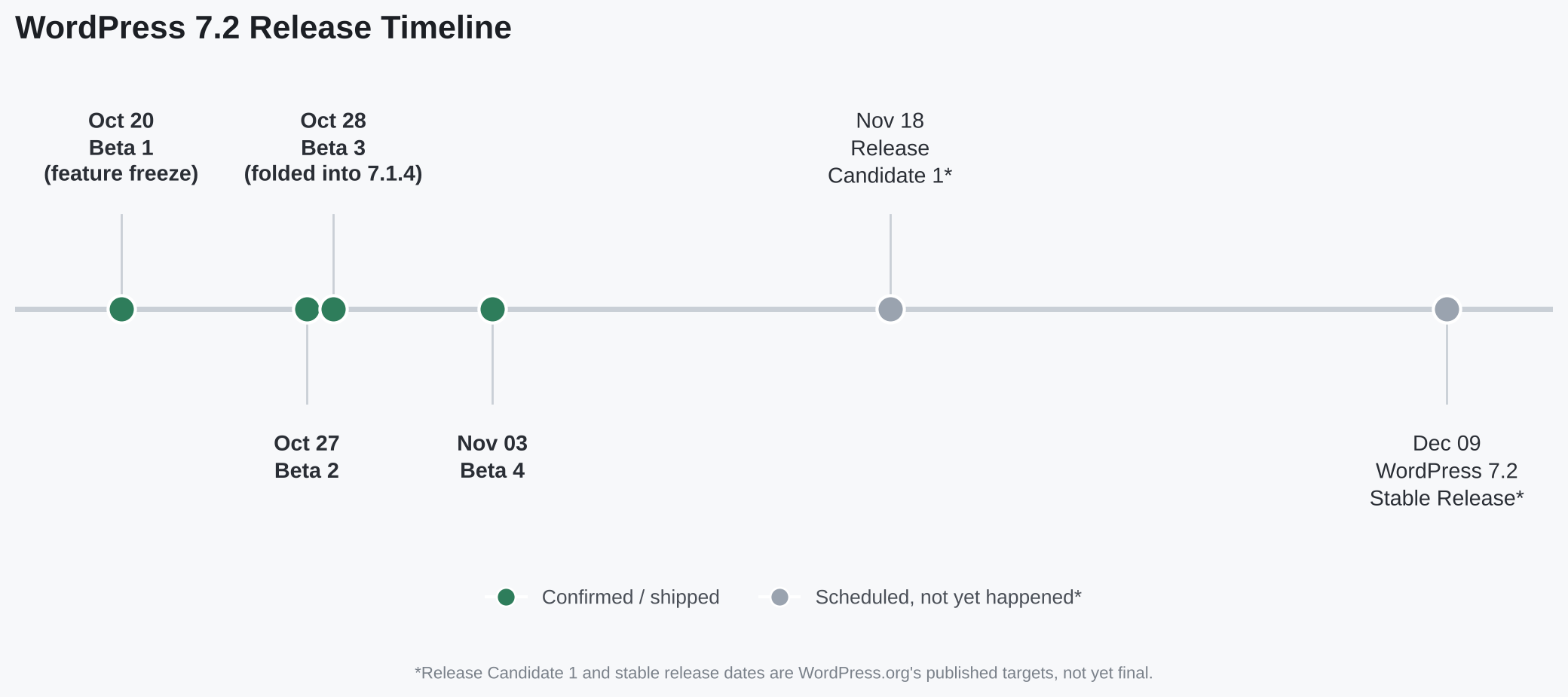
Two things stand out. First, Beta 3 never shipped as its own release, it was absorbed into the 7.1.4 security patch instead, which is a reminder that security fixes for the current stable version take priority over beta cadence for the next one. Second, there is roughly a two-week gap between Beta 4 and Release Candidate 1, which is normal, but also the window where most last-minute feature cuts tend to happen.
Should You Update to WordPress 7.2 Right Away
Not yet, and that is true of every WordPress major release, not just this one. Beta and RC builds are for testing, not production sites. WordPress.org’s own Beta 4 post says this directly: the build is not intended for live sites.
If you want to see Ipsum, test Suggestion Mode, or check plugin compatibility before December, the safest route is a disposable test environment rather than a staging copy of your live site. I covered this exact use case in a separate WordPress Playground guide, and it is genuinely the easiest way to try a beta build without risking anything. You get a sandboxed WordPress install running in the browser, and you can throw it away when you are done.
For production sites, my practical advice stays simple. Wait for the stable release on or around December 9, let it sit for a week while early adopters surface plugin conflicts, then update. That is not caution for its own sake, it is just how every recent WordPress major version has gone, including 7.1 and its four follow-up patch releases.
Plugin and theme developers have a narrower window and a different job. If you maintain anything that touches post inspector fields, application passwords, or custom block patterns, Beta 4 is already a reasonable point to start compatibility testing, since the feature set is mostly locked even if a few items like Suggestion Mode remain uncertain. Waiting until Release Candidate 1 to start testing usually means scrambling once the stable release ships two to three weeks later.
WordPress 7.2 Features FAQ
Will WordPress 7.2 change my current theme automatically?
No. Ipsum, the new default theme in WordPress 7.2, only applies to brand-new WordPress installations. Existing sites keep whatever theme they are already running after the update.
Is Suggestion Mode guaranteed to ship in WordPress 7.2?
Not yet confirmed. As of Beta 4, Suggestion Mode is still under review in Gutenberg, and both WordPress.org’s roadmap and third-party coverage note it could slip to a later release if it does not merge in time.
What is the Secrets API in WordPress 7.2 actually for?
It gives plugin developers a standard, encrypted place to store credentials like API keys, instead of plain text in the database. In this release it is mainly aimed at developers and WP-CLI; a full admin interface is planned for WordPress 7.3.
When is WordPress 7.2 expected to be released?
WordPress.org’s roadmap targets a release window of December 8 to 10, 2026, with December 9 named as the proposed date. Release Candidate 1 is expected around November 17 to 19.
Should I test the WordPress 7.2 beta on my live site?
No. WordPress.org explicitly says beta builds are not for production use. Use a disposable sandbox like WordPress Playground, or a proper staging environment, instead of testing on a live site.
What to Watch Before December 9
Two dates matter more than any single feature right now. Release Candidate 1, expected November 17 to 19, is when Suggestion Mode’s fate gets decided one way or the other. And the final release window of December 8 to 10 is when Ipsum, the Secrets API groundwork, and the application password alerts all become real for anyone running default WordPress settings.
If you manage client sites, this is a good moment to flag the December update window internally now, rather than scrambling in the first week of the month. Nothing here demands urgent action today. It is worth bookmarking, though, especially the credential changes, since those affect security posture more than they affect what visitors see on the front end.



Leave a response