

Google Universal Cart went live in Search and the Gemini app in the United States in mid-October 2026, according to Retail Brew’s October 26 report. It lets shoppers collect products from different brands into one cart and check out once, powered by Google’s Universal Commerce Protocol (UCP). For site owners, this is not just a shopping feature. It is a new way AI agents discover, evaluate, and buy products, and it runs on different signals than classic SEO. Below is what changed, how UCP actually works, and a practical checklist to get your store ready.
What Google’s Universal Cart Actually Does
Google announced Universal Cart at Google I/O 2026 in a post from Vidhya Srinivasan, the company’s VP and GM of Ads and Commerce. She described it as a shopping hub that follows a user across Google surfaces. Add an item while scrolling Search, chatting with Gemini, watching a YouTube video, or reading a Gmail newsletter, and it lands in the same cart.
Once an item is in the cart, Google Universal Cart keeps working in the background. It tracks price drops, shows price history, and alerts shoppers when something is back in stock. For categories like electronics, it flags compatibility problems between items and suggests fixes. Because it runs on Google Wallet, it can also factor in card perks and loyalty rewards when it recommends a payment method.
Checkout happens two ways. A shopper can pay with Google Pay in a few taps for participating brands, or the cart can hand off to the merchant’s own site to finish the purchase. Early retail partners named in Google’s announcement include Nike, Sephora, Target, Ulta Beauty, Walmart, Wayfair, and Shopify sellers such as Fenty and Steve Madden.
How the Universal Commerce Protocol Powers It
Universal Cart is the shopper-facing product. The engine behind it is the Universal Commerce Protocol, an open standard Google first launched on January 11, 2026 with checkout limited to single-item guest purchases. Google expanded it on March 19, 2026, in a post from Ashish Gupta, VP and GM of Merchant Shopping, titled “AI shopping gets simpler with Universal Commerce Protocol updates.”
That update added three capabilities merchants can choose to support:
- Cart. Lets an AI agent add several items from one store to a basket in a single pass, the way a person browsing a site would.
- Catalog. Lets an agent pull live product details, including variants, inventory, and pricing, straight from a retailer’s system instead of relying on a static feed snapshot.
- Identity Linking. Lets a logged-in shopper keep their loyalty pricing, points, or free shipping when buying through an AI surface instead of the retailer’s own checkout, using OAuth 2.0 to connect accounts.
Cart and Catalog are still draft specifications, so technical details may shift before they are finalized. Identity Linking is already part of the stable UCP release. Platform partners including Commerce Inc, Salesforce, and Stripe have said they plan to build UCP support into their own systems, which matters if your store runs on one of those platforms rather than integrating directly.
From Draft Spec to Live Checkout: A Quick Timeline
It took about nine months to go from a single-item checkout pilot to a live, multi-brand cart inside Search and Gemini. That pace is worth noting if you are deciding how urgently to act, since Google has kept shipping new UCP capabilities every few months rather than treating this as a one-time launch.
Why Google Universal Cart Changes Product Visibility, Not Just Checkout
Traditional Google Shopping relies on a feed you upload to Merchant Center, refreshed on a schedule you control, usually daily. Catalog, the UCP capability, pulls live data instead. An agent can ask your system directly whether a size is in stock right now, rather than reading what your feed said this morning.
That is a meaningful shift for GEO. In classic search, your product shows up because a crawler indexed a page and matched it to a query. In agentic shopping, an AI system queries your systems in real time and decides whether to surface your product at all, based on whether your data is complete, current, and machine-readable. A product with thin, stale, or inconsistent data risks being skipped entirely, not just ranked lower.
I’d treat Universal Cart the same way I treat any new AI surface: not a replacement for existing SEO work, but an additional layer of technical requirements sitting on top of it. The stores most likely to benefit early are the ones that already keep accurate, real-time inventory data, because that is the exact gap UCP’s Catalog capability was built to close.
Here’s a hypothetical to make that concrete. Say a mid-size outdoor gear retailer sells a jacket in six colors, and the navy size medium sold out two hours ago. Under a daily feed, Gemini or Google AI Mode could still surface that exact listing as in stock until the next feed sync runs. Under UCP’s Catalog capability, an agent queries the retailer’s live inventory system at the moment a shopper asks, sees the size is gone, and either shows the next closest size or flags another color instead. The retailer never loses the sale to a stock-out surprise at checkout, and the shopper never clicks through to a dead end. That is the practical difference between a feed snapshot and a live query, and it’s why inventory accuracy now carries more weight than it did a year ago.
The Google Universal Cart Readiness Checklist
None of this requires guessing. Based on Google’s own documentation and guidance from commerce platforms tracking the rollout, here is a practical order of operations.
1. Fix your product feed fundamentals first
Before touching anything UCP-specific, clean up the basics that Google Merchant Center already requires. Rocket.net’s August 2026 Universal Cart preparation guide recommends starting here because disapproved or incomplete listings cannot benefit from any downstream AI feature.
- Add a GTIN or MPN to every product, since missing identifiers are a common cause of feed disapprovals.
- Write titles that lead with brand, model, size, and color rather than marketing language.
- Write descriptions with real specs, materials, and compatibility notes instead of generic copy.
- Use high-resolution images on a clean background, with multiple angles where relevant.
- Map products into Google’s full category taxonomy, not just a top-level category.
- Fix disapproved products in Merchant Center, prioritizing whole categories with recurring errors.
2. Add the structured data AI agents actually read
This is where GEO and classic technical SEO overlap directly. Schema.org markup gives both search crawlers and AI agents a machine-readable description of what you sell.
- Product schema: name, description, image, SKU, brand, and category.
- Offer schema: price, currency, availability, item condition, and a
priceValidUntildate. - AggregateRating and Review schema: review counts, average scores, and individual reviews where you have them.
- Stock and lead-time details: backorder policy and expected ship dates, surfaced in structured data rather than buried in page copy.
Validate your output with Google’s Rich Results Test rather than assuming your platform’s default schema is complete. WooCommerce’s native markup, for example, often needs extending with a plugin like Rank Math, Yoast SEO for WooCommerce, or AIOSEO before it covers everything listed above.
3. Make your backend queryable, not just crawlable
Catalog’s whole premise is that an agent can ask your system a question and get a current answer. Webscale’s UCP readiness overview frames this as the core gap for most merchants: structured data that updates in near real time, not once a day.
- Enable automatic stock deduction so inventory counts reflect actual availability within minutes, not hours.
- Turn on automatic item updates in Merchant Center so price and stock changes sync without manual re-uploads.
- If you run Adobe Commerce or Magento, note there is no native UCP support in core as of this writing. Integration currently runs through the Merchant Center extension plus a custom checkout adapter.
- Audit how many separate systems hold your product and customer data. More than three disconnected systems is a sign your data will not stay synchronized well enough for a live-query model.
4. Get checkout and site performance AI-ready
An agent that adds your product to a cart still needs a checkout that works fast and reliably, especially during a handoff to your own site.
- Target Core Web Vitals thresholds: TTFB under 200 milliseconds, LCP under 2.5 seconds, and INP under 200 milliseconds, aiming for at least a 75% “Good” pass rate on mobile.
- Enable guest checkout by default and cut unnecessary form fields.
- Add Google Pay and Apple Pay alongside standard card payment, since Universal Cart checkout is built on Google Wallet.
- If you run WooCommerce, switch to the Checkout Block instead of the legacy shortcode, and load-test mobile checkout on real devices.
5. Decide whether you need full UCP integration right now
Not every store needs to integrate immediately. UCP checkout is currently available to eligible U.S.-based merchants, with Google saying global expansion to Canada and Australia is planned for the coming months, followed later by the U.K. If you sell primarily outside the U.S. today, the more urgent work is steps one through four, since clean data and fast checkout help with every AI surface, not just Universal Cart. If you already sell through Shopify, Salesforce Commerce, or Stripe, check whether your platform’s planned UCP support covers onboarding for you before building a custom integration.
Small or single-owner stores have a reasonable case for waiting on direct integration altogether. Cart and Catalog are still draft specs, Google’s simplified Merchant Center onboarding has not reached every account yet, and the engineering cost of a custom checkout adapter is hard to justify without a clear estimate of how much traffic Universal Cart will actually send. In that case, the checklist’s first four steps still pay off on their own, since they also support visibility in Google’s AI Overviews and in AI Mode, not just Universal Cart specifically.
What the Rollout Timeline Shows
The chart below lays out the four public milestones in the Google Universal Cart rollout Google has confirmed, from UCP’s narrow January launch to the live, multi-brand cart that shipped in Search and Gemini in October.
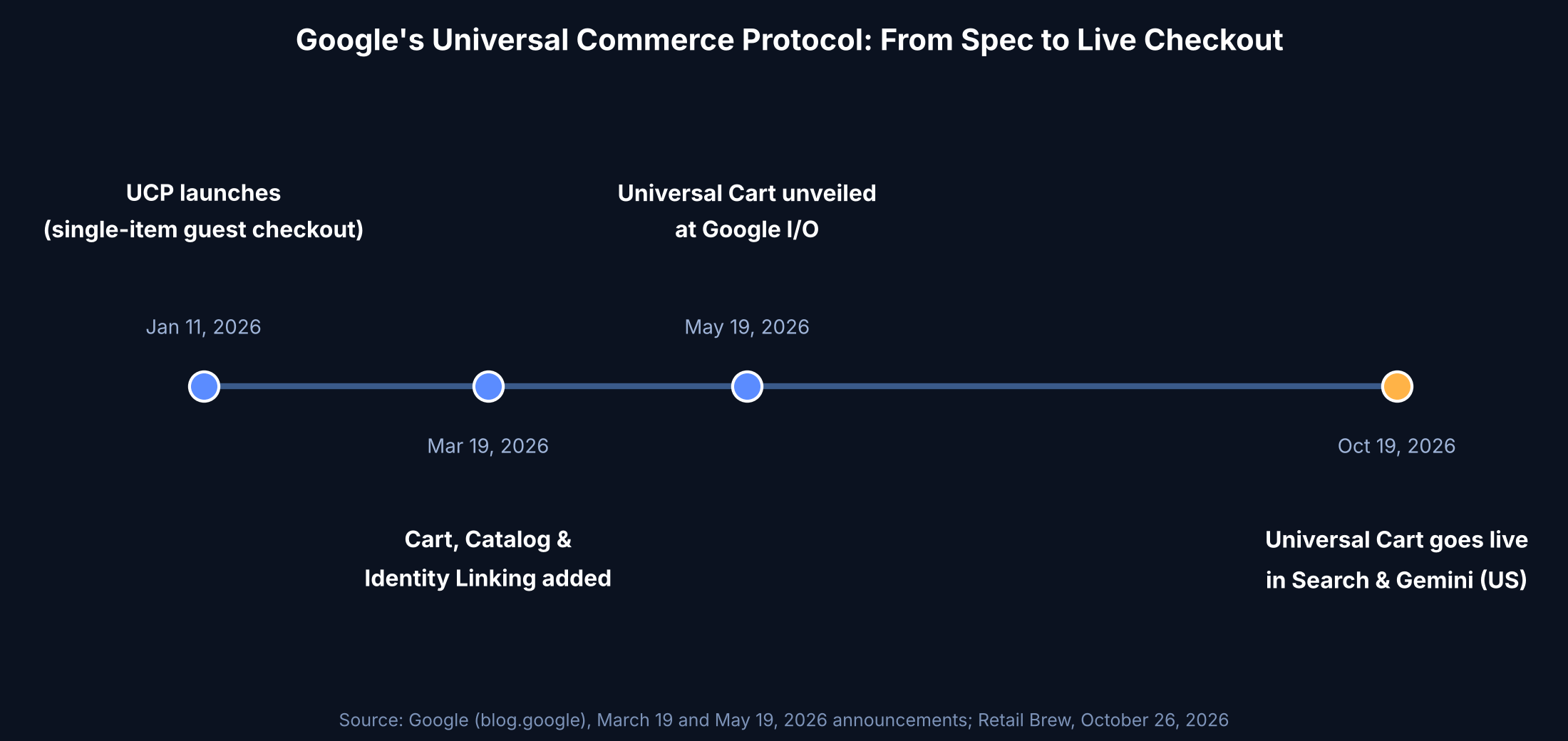
Each step added a capability merchants could opt into separately, which is why the checklist above treats feed hygiene, structured data, backend sync, and checkout speed as sequential rather than optional extras bundled into one big project.
Who Should Act First
Retailers already on the partner list, Nike, Sephora, Target, Ulta Beauty, Walmart, Wayfair, and larger Shopify sellers, have a head start because Google worked with them directly during development. For everyone else, the realistic entry point is Merchant Center’s simplified UCP onboarding, which Google says is rolling out over the coming months rather than all at once.
If your store sells perishable inventory, frequently out-of-stock items, or products with fast-changing pricing, Catalog’s real-time lookup is the capability most worth prioritizing, since that is precisely the data gap it is designed to close. If your catalog is small and stable, the bigger win may simply be clean structured data, since that also helps visibility in AI Overviews and AI Mode results that have nothing to do with checkout.
Frequently Asked Questions
Does Universal Cart replace Google Shopping ads or the standard Merchant Center feed?
No. Universal Cart and UCP sit on top of your existing Merchant Center setup. A clean, approved product feed is still the foundation, and Google’s own guidance treats feed quality as a prerequisite rather than something UCP replaces.
Do I need custom engineering to support UCP?
It depends on your platform. Merchants on Shopify, Salesforce Commerce, Stripe, or Commerce Inc may get UCP support through their platform as those partners build it in. Merchants on Adobe Commerce or custom-built sites currently need a Merchant Center extension plus a custom checkout adapter, since there is no native core support yet.
Is Universal Cart available outside the United States?
Not yet. Google has said UCP-powered checkout is coming to Canada and Australia in the coming months, with the U.K. following later. Merchants outside the U.S. can still prepare by fixing feed and structured data issues now.
Will skipping UCP hurt my regular search rankings?
Google has not said that UCP adoption is a ranking factor for standard Search results. It is a commerce and AI-shopping capability, not a confirmed signal in classic organic ranking. Treat the readiness checklist as protecting your visibility in AI shopping surfaces specifically, separate from core SEO rankings.
Universal Cart is still a U.S.-only, early-stage rollout, and Cart and Catalog remain draft specifications that could change before Google finalizes them. For now, the practical move is the same one that has applied to every AI search surface this year: get your product data accurate and current, make it machine-readable through schema, and keep checkout fast, then layer in direct UCP integration once your platform supports it or once the simplified Merchant Center onboarding reaches your account. Readers tracking how AI Mode’s monetization push and AI Mode performance reporting are evolving should watch this rollout closely, since agentic checkout is the next piece of that same shift from search results to search transactions.



Leave a response