


JavaScript powers many of today’s websites, from interactive applications and e-commerce stores to blogs and content platforms. It can create fast, engaging experiences, but it can also introduce SEO problems when important content, links, or metadata depend too heavily on JavaScript.
This is where JavaScript SEO becomes important.
JavaScript SEO is the practice of making JavaScript-powered websites accessible to search engines so they can crawl, render, understand, and index the content correctly.
The goal isn’t to remove JavaScript. Instead, it is to use JavaScript intelligently while ensuring search engines can access the information that matters most. Technical SEO for developers
What Is JavaScript SEO?
Traditional HTML pages can deliver important content directly in the server response. A JavaScript-heavy application may initially return something like:
<div id="app"></div><script src="/app.js"></script>The actual article, product information, navigation, or other content may only appear after JavaScript executes.
For a human visitor, this process usually happens automatically. The browser downloads JavaScript, executes it, requests additional data when necessary, and builds the final page.
Google Search can also process JavaScript. Google generally works through three broad stages:
Crawling → Rendering → Indexing
However, the fact that Google can execute JavaScript doesn’t mean every important element should depend on it.
That distinction is at the heart of JavaScript SEO.
Does JavaScript Hurt SEO?
A properly implemented JavaScript website can perform extremely well in organic search. Problems occur when JavaScript becomes a dependency for something search engines need to discover or understand.
Common examples include:
- Important content appears only after an API request.
- Important links aren’t normal <a href=””> links.
- A JavaScript error prevents the page from rendering.
- Metadata is generated incorrectly.
- Large JavaScript files make pages unnecessarily slow.
- Client-side routing creates difficult-to-crawl URLs.
- Lazy-loaded content depends on user interaction.
- Structured data fails to appear correctly.
In these situations, JavaScript isn’t necessarily the problem; the implementation is.
How Google Processes JavaScript
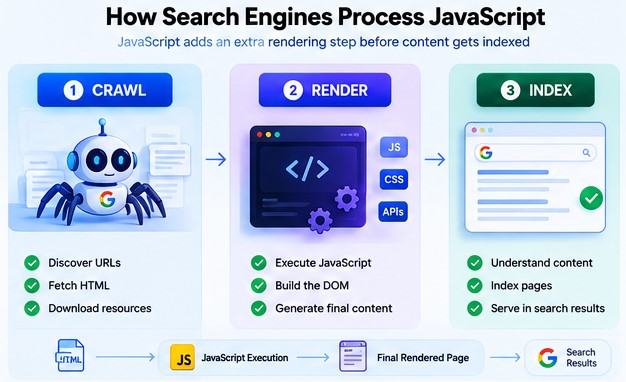
Understanding Google’s process makes JavaScript SEO easier.
1. Crawling
Googlebot requests a URL and examines the response. It can discover links in HTML and add URLs to its crawl queue.
If important pages aren’t linked properly, Google may have difficulty discovering them.
2. Rendering
If JavaScript is needed to display the page’s content, Google can render the page using its Web Rendering Service.
Some applications use an app shell model, where the initial HTML contains very little actual content. JavaScript must execute before meaningful content becomes available.
3. Indexing
Google uses the information it can access after processing the page to understand it and potentially add it to its index.
This creates an important SEO principle:
If important content only exists after JavaScript executes, your JavaScript needs to work correctly during rendering.
A traditional page may follow:
HTML → Content
A JavaScript application may require:
HTML → JavaScript → API → Response → DOM update → Content
Every additional dependency creates another opportunity for failure or delay.
Why JavaScript Can Hurt AI Search Visibility
JavaScript SEO also matters for AI-powered search experiences.
Google’s guidance indicates that foundational SEO principles continue to apply to features such as AI Overviews and AI Mode. A page generally needs to be accessible and eligible in Google Search before it can appear as a supporting link in these experiences.
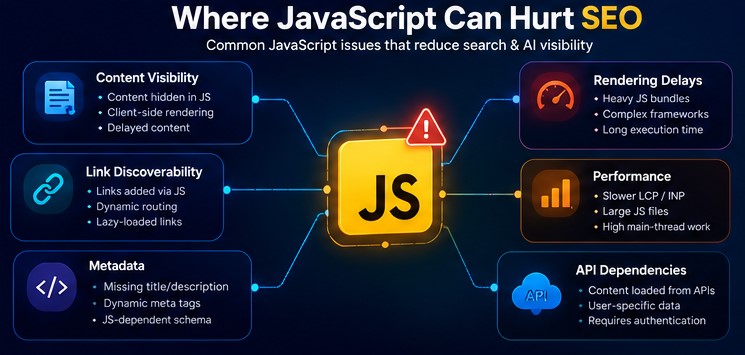
This means JavaScript problems can indirectly become AI search visibility problems.
For example:
- Broken JavaScript can prevent important content from appearing.
- Incorrect links can make related pages harder to discover.
- Slow JavaScript can create poor user experiences.
- Broken structured data can remove useful machine-readable context.
- Failed APIs can produce incomplete pages.
There is no special “JavaScript penalty” for AI search.
The issue is more fundamental:
AI search depends on accessible, discoverable, understandable web content and JavaScript can interfere with all three.
Common JavaScript SEO Problems
1. Important Content Exists Only After JavaScript Runs
A common problem occurs when the server initially sends an empty container:
<main id=”content”></main>
JavaScript then fetches the article from an API.
If the API fails or JavaScript encounters an error, the important content may never appear.
For SEO-critical pages such as blog posts, product pages, service pages, documentation, and landing pages, consider making meaningful HTML available earlier through server-side or pre-rendering approaches.
JavaScript can still enhance the page afterward.
2. JavaScript-Generated Links Are Implemented Incorrectly
Search engines need links to discover pages.
A JavaScript-only approach such as:
<a onclick=”goTo(‘/javascript-seo’)”>JavaScript SEO</a>
is less reliable than:
<a href=”/javascript-seo/”>JavaScript SEO</a>
Google recommends crawlable <a> elements with URLs in their href attributes.
A clickable element isn’t automatically an SEO-friendly link. Important navigation should work as real web navigation.
3. Client-Side Routing Creates URL Problems
Single-page applications often use client-side routing. This isn’t inherently bad, but important content should have proper, unique URLs.
Avoid relying on URLs such as:
example.com/#/products
Prefer:
example.com/productsexample.com/servicesexample.com/blog
Using meaningful URLs makes pages easier to discover, crawl, and understand.
Your JavaScript router should enhance normal web navigation rather than replace it.
4. JavaScript Makes Pages Slower
JavaScript needs to be downloaded, parsed, compiled, and executed. Large bundles can increase bandwidth and CPU usage and delay rendering.
The solution isn’t to remove JavaScript completely.
Instead:
Use only the JavaScript you actually need.
Practical techniques include:
- Remove unused dependencies.
- Reduce bundle sizes.
- Use code splitting.
- Defer non-critical scripts.
- Lazy-load functionality that isn’t immediately required.
- Reduce unnecessary third-party scripts.
- Minimize long-running JavaScript tasks.
- Load interactive components only when needed.
The goal isn’t an arbitrary JavaScript size limit. The goal is to eliminate unnecessary work.
5. JavaScript Errors Can Break SEO Content
A small JavaScript error can prevent an entire page from rendering.
For example:
const article = data.article.content;
If data.article is undefined because an API response changed, the application may throw an error and display incomplete content.
Monitor:
- JavaScript exceptions
- Failed API requests
- 404 JavaScript files
- Blocked resources
- Authentication requirements
- CORS errors
- Incorrect redirects
- Hydration errors
- Differences between source HTML and rendered DOM
Google Search Console and the Rich Results Test can help identify rendering problems.
Lazy Loading Can Hide Important Content
Lazy loading can improve performance, but it needs to be implemented carefully.
If important content only becomes available after a click, scroll, hover, or unusual interaction, search engines may not discover it reliably.
Don’t assume:
“The user will scroll here, so the content will load.”
A better rule is:
Lazy-load non-critical resources, but don’t make core SEO content unnecessarily dependent on user interaction.
JavaScript Can Complicate Metadata and Structured Data
JavaScript can modify important SEO elements such as:
- <title>
- Meta descriptions
- Canonical URLs
- Robots directives
- Structured data
Google can process some JavaScript-generated metadata and JSON-LD, but important SEO signals should remain consistent and straightforward.
Avoid creating conflicting canonical URLs or structured data that doesn’t accurately represent the visible page.
Client-Side Rendering vs. Server-Side Rendering
One of the biggest technical decisions affecting JavaScript SEO is where your content gets rendered.
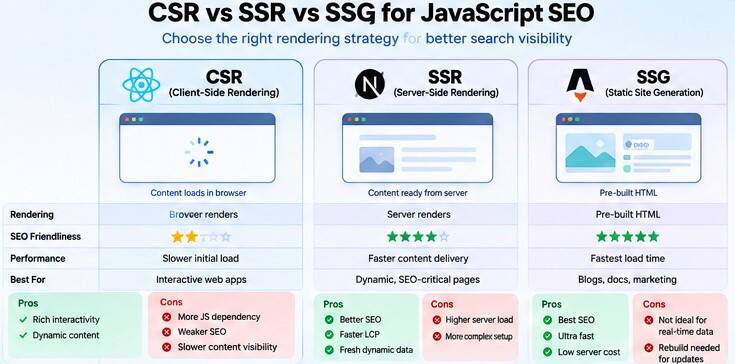
Client-Side Rendering (CSR)
With CSR, the browser receives a basic HTML shell and JavaScript builds much of the page. This can provide excellent application experiences but makes SEO more dependent on successful JavaScript execution.
Server-Side Rendering (SSR)
With SSR, the server generates meaningful HTML before sending it to the browser. This can make important content available earlier.
Static Site Generation (SSG)
SSG generates pages ahead of time. It works particularly well for blogs and other content-heavy websites.
Hybrid Rendering
Hybrid approaches combine these methods. For example, an article can be server-rendered while JavaScript handles filters, comments, charts, menus, or calculators.
For many modern content-focused websites, hybrid rendering provides a useful balance between SEO and interactivity.
JavaScript SEO Best Practices
Now let’s turn the theory into an actionable checklist.
1. Put Important Content in Accessible HTML
Make your H1, main content, important headings, primary navigation, product information, and core internal links available in the rendered page.
2. Use Real HTML Links
Prefer:
<a href=”/web-development/”>Web Development</a>
over JavaScript-only navigation.
3. Use Meaningful URLs
Use descriptive URLs such as:
/dev/javascript-seo//dev/react-seo//guides/core-web-vitals/
4. Choose the Right Rendering Strategy
Identify which pages need organic visibility and choose CSR, SSR, SSG, or hybrid rendering accordingly.
5. Keep JavaScript Lean
Regularly audit large libraries, duplicate dependencies, unused code, third-party scripts, and scripts loaded unnecessarily across pages.
6. Test Rendered HTML
Don’t rely only on View Source.
Use:
- Google Search Console URL Inspection
- Rich Results Test
- Browser DevTools
- JavaScript Console
- Network panel
- Lighthouse
- PageSpeed Insights
- Server logs
7. Monitor Real-User Performance
Pay attention to loading performance, interactivity, layout stability, long JavaScript tasks, and main-thread activity.
8. Make Structured Data Reliable
Ensure JSON-LD accurately describes the visible page and test it after implementation.
9. Don’t Block Essential Resources
Check robots.txt, CDN rules, authentication, firewall restrictions, JavaScript URLs, and API accessibility.
10. Build for Users First
Don’t create a complicated JavaScript application when a simple HTML page can provide the same experience.
Use JavaScript where it creates real value.
How to Test a JavaScript Website for SEO
Here’s a practical workflow developers can use.
Step 1: Check the Raw HTML
Ask:
- Is the title present?
- Is the H1 present?
- Is the primary content present?
- Are important links present?
- Is the canonical URL present?
- Is structured data present?
Step 2: Inspect the Rendered Page
Use Google Search Console’s URL Inspection Tool and compare the rendered result with what users see.
Look for missing content, broken navigation, rendering errors, incorrect metadata, and missing links.
Step 3: Check JavaScript Errors
Use DevTools and look for errors such as:
- Uncaught TypeError
- Failed to fetch
- 404
- CORS errors
- ReferenceError
- Network errors
An error affecting the main rendering path can be serious.
Step 4: Inspect Network Requests
Check for slow API calls, failed requests, large JavaScript files, third-party resources, and requests that must complete before content appears.
Step 5: Test Different Devices
Test mobile, desktop, slower networks, and lower-powered devices. A page that works on a developer’s laptop may behave differently for real users.
JavaScript SEO Checklist
Before publishing a JavaScript-heavy page, ask:
Crawlability
- Can search engines access the URL?
- Are important resources crawlable?
- Are internal links real <a href> links?
- Are URLs unique and meaningful?
Rendering
- Does important content appear after rendering?
- Does JavaScript execute without critical errors?
- Are API requests reliable?
- Is content available without unusual interaction?
Indexing
- Is the page indexable?
- Is the canonical correct?
- Is the title unique?
- Is the meta description appropriate?
- Are important headings present?
Performance
- Is unnecessary JavaScript removed?
- Are non-critical scripts deferred?
- Is code split where appropriate?
- Are third-party scripts controlled?
- Are long JavaScript tasks minimized?
AI Search Visibility
- Is the page eligible for Google Search?
- Can Google render the important content?
- Is the content genuinely useful?
- Are important facts clearly explained?
- Can search engines understand the page without fragile interactions?
There is no secret JavaScript technique for AI Overviews. Strong technical SEO remains the foundation.
What Developers and SEOs Should Do Together
JavaScript SEO works best when developers and SEO professionals collaborate before launch.
SEO teams should communicate:
- Pages that need organic visibility
- URL requirements
- Internal linking requirements
- Metadata requirements
- Structured data requirements
- Indexability rules
- Rendering expectations
Developers should communicate:
- Rendering architecture
- Client/server responsibilities
- API dependencies
- JavaScript bundles
- Routing behavior
- Performance constraints
- Framework limitations
SEO teams shouldn’t discover technical problems after development is complete, and developers shouldn’t remove JavaScript simply because someone says “JavaScript is bad for SEO.”
The objective is to use JavaScript where it creates value while keeping important content accessible.
Frequently Asked Questions About JavaScript SEO
Is JavaScript bad for SEO?
No. JavaScript itself isn’t bad for SEO. Problems occur when it prevents search engines from accessing, rendering, discovering, or understanding important content.
Can Google crawl JavaScript websites?
Yes. Google Search can process JavaScript and render JavaScript-powered pages. However, these websites have additional technical considerations compared with pages where important content is already available in HTML.
Does JavaScript affect AI Overviews?
It can affect AI visibility indirectly if JavaScript prevents a page from being properly crawled, rendered, indexed, or understood. There isn’t a separate JavaScript requirement specifically for AI Overviews.
Should I remove JavaScript for SEO?
No. Remove unnecessary JavaScript, not JavaScript that provides useful functionality. The goal is a website that is fast, accessible, useful, and crawlable.
Is server-side rendering better for SEO?
SSR can simplify SEO because important content is delivered as HTML before client-side JavaScript takes over. However, CSR, SSR, SSG, and hybrid approaches can all work when implemented correctly.
Can JavaScript-generated links be crawled?
Yes, when they use appropriate HTML anchor elements with valid URLs in their href attributes. JavaScript-only navigation should be avoided for important links.
Can JavaScript-generated structured data be indexed?
Google supports JavaScript-generated structured data, including JSON-LD. However, it should be tested to ensure the correct data appears in the rendered page.
How can I check whether Google can render my JavaScript?
Use Google Search Console’s URL Inspection Tool or the Rich Results Test. DevTools can also help identify JavaScript errors and failed network requests.





Leave a response