

Surfer MCP is the feature that lets AI assistants like Claude, ChatGPT, and Cursor pull live data from Surfer and use it to write, score, and publish content without you switching tabs. Surfer, the content optimization platform best known for its Content Editor, moved Surfer MCP out of beta in its October 2026 product update. The same release added a closed beta of a crawler-tracking feature called Agent Analytics and a reworked Topical Map tool. For content marketers, this matters because it folds research, drafting, and distribution tracking into one AI-driven workflow instead of three separate browser tabs. If you run a content team, or you’re a solo marketer juggling briefs and publishing deadlines, this update changes how much of that work an AI agent can now handle directly, according to Surfer’s October 2026 product roundup.
What Is Surfer MCP
MCP stands for Model Context Protocol, an open standard that lets AI assistants connect to outside tools and data instead of relying only on what they already know. Surfer built its version of this on top of that standard. According to Surfer’s own release notes, Surfer MCP now “covers the entire Surfer toolset” and adds ready-made skills, which are packaged workflows for writing a new article or improving an existing page with a single command.
In plain terms, Surfer MCP means you can open Claude or ChatGPT, ask it to draft a blog post using Surfer’s content guidelines, and get an output that reflects Surfer’s keyword and structure recommendations without opening the Surfer app at all. The agent fetches your brief, your target score, and your brand voice settings directly from your Surfer account.
Before this update, Surfer MCP existed only as a beta, open to a smaller group of testers. Surfer’s release notes describe the update plainly: “It’s fresh out of Beta, so tell us what to build next.” That is the company’s own framing, not a polished marketing claim, and it signals the feature is still young.
Setup is simple on paper. You point an MCP-compatible agent, such as Claude, Cursor, ChatGPT, or Codex, at Surfer’s MCP server address and sign in with your existing Surfer account. No separate installation or coding is required, based on Surfer’s MCP documentation page.
What Changed in Surfer’s October 2026 Update
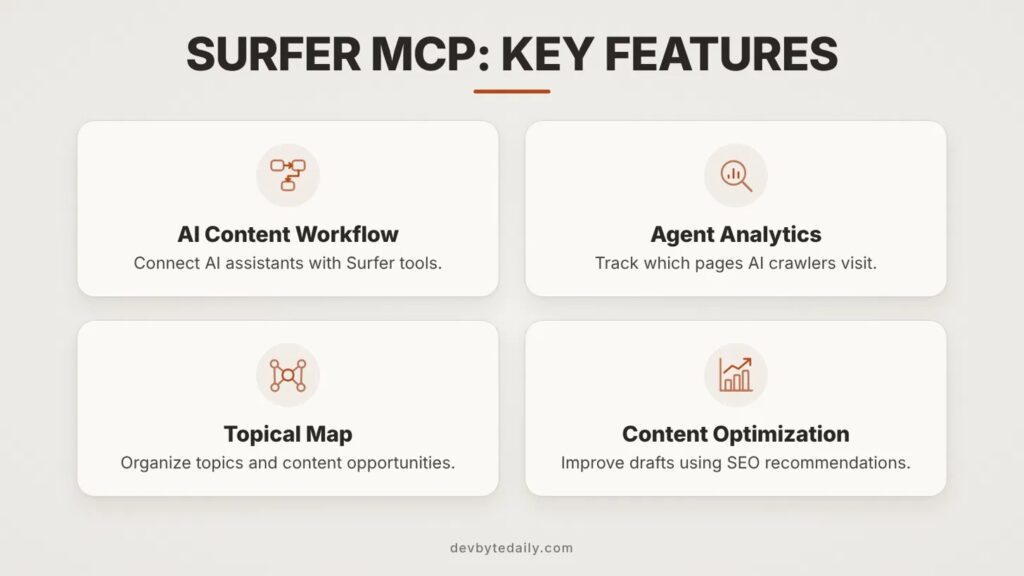
The MCP release did not arrive alone. Surfer bundled several changes into the same announcement, all aimed at the same goal: connecting content creation to content performance data.
Agent Analytics (closed beta). This feature tracks AI crawlers through your server logs and shows which pages ChatGPT, Perplexity, and similar bots actually fetch, and which pages they skip entirely. It also aims to show human visitors who arrive at your site after an AI assistant sent them there. This is a content distribution signal, not a ranking signal, and it is new territory for a tool like this.
Topical Map (in development). Surfer rebuilt its content planning map to weigh entity authority, user intent, and AI visibility together, rather than keyword volume alone. Each content hub it suggests comes with a short explanation of what it covers and why it belongs in your plan. It is not generally available yet; interested teams have to request access directly from Surfer.
Smarter Recommendations. Surfer’s existing recommendations engine now pulls from AI Search Analytics data to build what it calls an action plan, covering both on-page fixes and outreach, such as who to contact for a mention or citation. Recommendations can now be paired with Surfer MCP so an agent can act on the top items automatically.
WordPress plugin parity. The Surfer Content Editor plugin for WordPress now matches the main app’s interface and functions, combining AI and SEO scoring into a single number instead of two separate scores.
New languages. The app interface is now available in French and Polish, in addition to English, which Surfer says supports local teams and makes stakeholder reporting easier in those markets.
Taken together, this update treats content creation and content distribution as one connected job. That is the real headline for content marketers, more than the MCP label itself.
How Surfer MCP Works in a Real Content Workflow
Here is a concrete scenario to make this less abstract.
Example: Drafting a buyer’s guide with Surfer MCP.
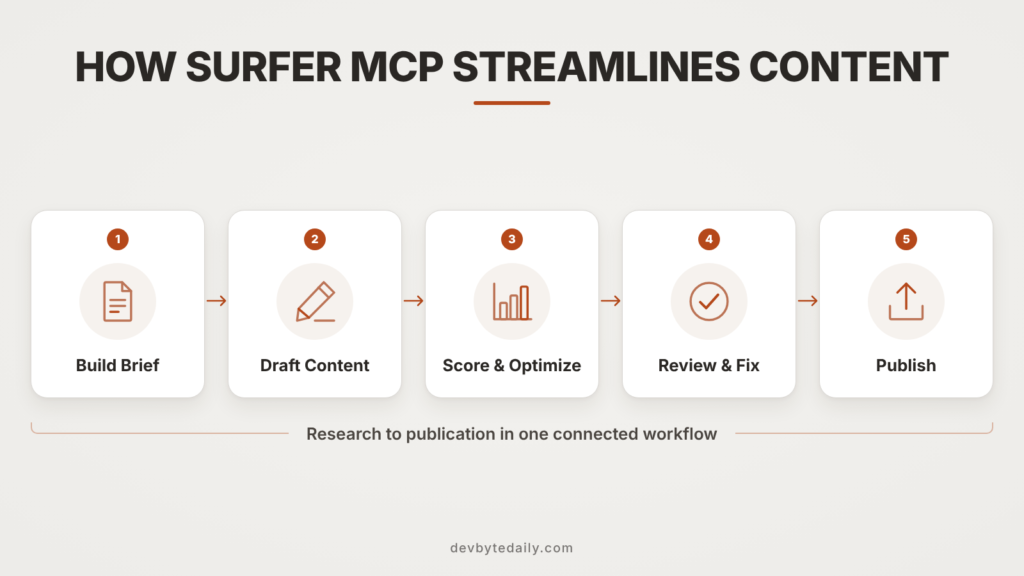
A content marketer needs a new buyer’s guide for a mid-size SaaS company. Instead of opening Surfer, building a brief, then pasting that brief into a separate writing tool, the workflow collapses into a single chat thread.
- The marketer opens Claude and asks it to pull the latest content brief for the target keyword from their connected Surfer account.
- The agent returns Surfer’s structure recommendations: suggested headings, word count range, and terms competitors use that the draft is currently missing.
- The marketer asks the agent to draft the guide using that brief and the company’s saved brand voice settings.
- The agent scores the draft against Surfer’s combined AI and SEO content score and flags gaps, such as a missing FAQ section or thin coverage of pricing.
- Once the draft clears the target score, the marketer asks the agent to publish it as a draft post through a connected CMS integration, in the same thread.
None of these steps require leaving the chat window. That is the practical change Surfer MCP makes, compared to the old workflow of brief in one tab, writing tool in another, and CMS in a third.
Pricing for Surfer MCP and Other Plans
Surfer MCP is not available on every plan. Based on Surfer’s current pricing page, it ships with four of the six plans, all billed at the monthly-equivalent rate for annual billing:
- AI Search Analytics: $82/month. Includes AI visibility tracking for 50 prompts, refreshed daily, five brand spaces, and MCP access. No content creation allowance.
- Discovery: $49/month. Includes 120 documents for creation or optimization and tracking for 10 pages, but does not include MCP.
- Standard: $99/month. Includes 360 documents and weekly AI prompt tracking, but also does not include MCP.
- Pro: $182/month. Includes 360 documents, daily tracking for 50 prompts, internal linking tools, and MCP access.
- Peace of Mind: $299/month. Includes unlimited documents (subject to a fair-use policy), API access, and MCP.
- Enterprise: Custom pricing, with SSO and white-label options.
Monthly billing is available too, at a higher rate; Surfer states annual billing saves up to 17% compared to paying monthly. The practical takeaway: if you want AI agents writing and optimizing content for you, you need at least the Pro plan, or the narrower AI Search Analytics plan if you only want visibility tracking and don’t need Surfer’s own document credits.
Agent Analytics and Why Content Distribution Tracking Matters
Most content tools measure success through search rankings or page traffic. Agent Analytics measures something different: whether AI crawlers are actually reading your content at all.
This fits content marketing more than technical SEO, because it answers a distribution question content teams have struggled to answer this year: is the content you publish actually reaching the AI systems that increasingly summarize or cite it for users? Knowing which pages ChatGPT’s or Perplexity’s crawlers skip is information you can act on, by restructuring those pages or linking to them differently from pages the crawlers do visit.
Surfer is not the only vendor building a dedicated measurement layer for this. DevByteDaily’s comparison of AI visibility checkers from Ahrefs and Semrush covers a similar idea from a different angle: tracking how often a brand gets cited in AI-generated answers rather than which pages get crawled. Rank Math has also moved into this space; see our setup guide for Rank Math’s AI Visibility feature for a WordPress-native option. Together, these tools point at the same gap: content teams need to know whether AI systems are actually engaging with what they publish, not just whether it ranks.
The catch is that Agent Analytics is still in closed beta and runs through Cloudflare’s server log data, which means setup is manual and access is limited. Surfer has not said when it will open to all users or which plans will include it. Treat this as a feature to watch rather than one to plan a workflow around today.
Pros and Cons of Surfer’s AI Content Workflow Tool
No tool deserves an unqualified recommendation, and Surfer MCP is new enough that some rough edges are expected.
What works well:
– It removes real friction between research, writing, and optimization steps that used to live in separate tools.
– Ready-made skills give less technical team members a simple way to run a consistent content workflow without learning Surfer’s full interface.
– Pairing Agent Analytics with content recommendations is a genuinely new way to connect distribution data to action, even if it’s early.
– The WordPress plugin update removes a long-standing annoyance of juggling two separate scores for the same page.
What to watch out for:
– MCP access requires a mid-tier plan or higher. Teams on Discovery or Standard don’t get it without upgrading.
– Agent Analytics and the new Topical Map are both gated behind manual beta requests, so you can’t just turn them on.
– Because this is fresh out of beta, expect bugs, incomplete documentation, and features that change shape over the next few release cycles.
– An AI agent drafting content through MCP still needs a human editor checking facts, tone, and claims. Surfer’s scoring tells you whether a draft matches a brief, not whether it is accurate or well-argued.
Who Surfer MCP Is For, and Who Should Skip It
Surfer MCP fits content teams that already use Surfer for briefs and optimization and want to cut steps out of a multi-tool workflow. It also fits agencies producing content at volume, where ready-made skills can standardize output across writers. Teams already comfortable connecting AI assistants to outside tools, such as a CMS or analytics platform, will find the setup familiar. If you’re evaluating other AI-assisted marketing tools at the same time, our breakdown of HubSpot’s Breeze Assistant covers a similar build-vs-buy question for a different part of the marketing stack.
It is a weaker fit for anyone on a lower-tier Surfer plan who isn’t ready to upgrade just for agent access, and for smaller sites publishing a handful of posts a month, where the manual overhead of setting up an MCP connection probably outweighs the time saved. If you don’t already use Surfer, this update alone isn’t a strong enough reason to switch platforms. It is an enhancement for existing users, not a new standalone product.
FAQ
Is Surfer MCP free to use?
No. It is included only in the AI Search Analytics, Pro, Peace of Mind, and Enterprise plans, starting at $82 a month on annual billing, according to Surfer’s pricing page.
Do I need to know how to code to set up Surfer MCP?
No. Surfer’s documentation describes connecting it through settings in Claude, Cursor, ChatGPT, or Codex, without writing code, though ChatGPT’s setup requires enabling Developer mode first.
What is the difference between Surfer MCP and Surfer’s regular Content Editor?
The Content Editor is Surfer’s web app for writing and scoring content. Surfer MCP brings that same data and scoring into AI assistants outside the app, so you can work from a chat interface instead.
Can Agent Analytics tell me if my content is cited in AI answers?
Not directly. It tracks which pages AI crawlers visit on your site, which is a distribution signal. Surfer’s separate AI Search Analytics feature is the one built to track citations and mentions in AI answers.
Is the new Topical Map available to everyone?
Not yet. As of October 2026, it’s in active development and only available to teams who request access directly from Surfer.
Surfer is not alone in making this move. Semrush announced its own unified content optimization update earlier in 2026, connecting SEO and AI search workflows inside its Enterprise product. Semrush cited an internal estimate that only about 22.5% of teams had fully merged their SEO and AI search activities at that point, which is the gap both vendors are now building toward. What this means for you: if your content planning and your AI-search monitoring still live in separate spreadsheets or separate tools, you’re behind where the market is heading, regardless of which vendor you use.
Why This Matters
Content marketing tools are starting to treat AI agents as a real publishing channel instead of only a research shortcut, and Surfer’s MCP update is one of the clearer examples of that shift so far. The more useful signal in this release isn’t the agent connection itself. It’s pairing content creation with distribution data like Agent Analytics, because that closes a gap most content tools still leave open: knowing whether what you publish is actually being read by anything, human or machine.
What to do next:
– If you’re already on Surfer’s Pro plan or higher, test Surfer MCP on a low-stakes piece of content before rolling it into your main workflow.
– If you’re on a lower-tier plan, weigh the upgrade cost against how much time your team currently loses switching between briefing, writing, and publishing tools.
– Whether or not you use Surfer, start asking what your own content distribution data looks like once AI crawlers are part of your traffic picture, because that question isn’t going away.





Leave a response