

SEO doesn’t have to mean staring at spreadsheets for hours or manually checking every heading, keyword, and meta description.
With the right workflow, ChatGPT can become a powerful on-page SEO assistant.
You can use it to understand search intent, build content outlines, improve headings, identify keyword opportunities, write meta descriptions, strengthen internal linking, and audit existing content.
But there’s an important distinction: ChatGPT should assist your SEO process, not replace SEO judgment.
The best results come from combining AI’s speed with human expertise, original insights, accurate information, and real user needs.
This guide shows you exactly how to use on-page SEO with ChatGPT without turning your content into generic AI-generated filler.
What Is On-Page SEO with ChatGPT?
On-page SEO with ChatGPT means using ChatGPT to assist with the elements you control directly on a webpage.
These elements include:
- Page titles
- Headings
- Main content
- Keyword usage
- Search intent
- Meta descriptions
- Internal links
- Image alt text
- URLs
- Content structure
- Readability
- Content gaps
Google recommends creating helpful, reliable, people-first content and using words that people actually search for in important parts of a page, including titles, headings, alt text, and link text. (Google for Developers)
ChatGPT can help you work through many of these tasks faster.
For example, instead of asking:
“Write an SEO article about JavaScript.”
You can give ChatGPT a much more useful instruction:
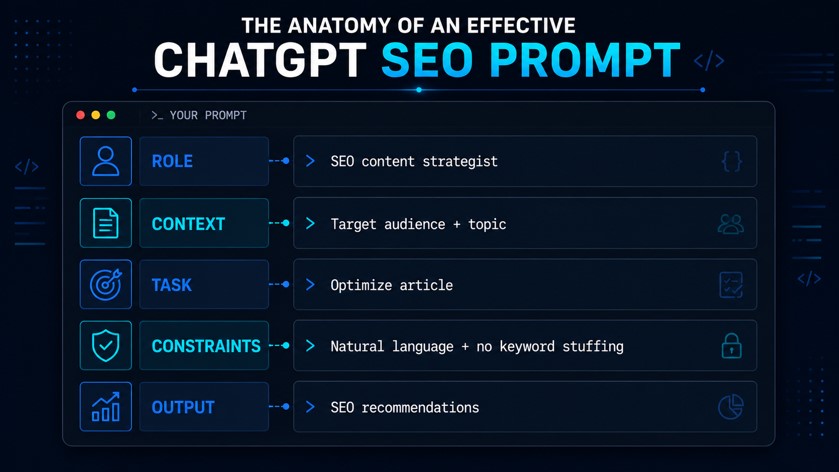
“Analyze the search intent behind ‘JavaScript SEO’ and create an outline that answers beginner and intermediate questions. Prioritize practical examples and avoid keyword stuffing.”
The second prompt gives the model a job rather than simply asking it to generate words.
What Can ChatGPT Do for On-Page SEO?
ChatGPT works particularly well for research assistance, content planning, optimization, and quality checks.
1. Understand Search Intent
Before writing anything, determine what the searcher actually wants.
For the keyword “on-page SEO with ChatGPT,” the intent is primarily informational. The reader likely wants to learn how to use ChatGPT for practical SEO tasks.
Ask ChatGPT:
“Analyze the search intent behind the keyword ‘on-page SEO with ChatGPT’. Identify the primary user goal, secondary questions, likely beginner concerns, and the type of content that would best satisfy the searcher.”
Use the result as a starting point not as unquestionable truth.
2. Build a Content Outline
A strong outline prevents random keyword placement and repetitive sections.
Prompt:
“Create an SEO-focused outline for an article targeting ‘on-page SEO with ChatGPT’. Include H2 and H3 headings, related questions, practical examples, and a logical progression from beginner concepts to advanced workflows.”
Then review the outline yourself.
Remove anything irrelevant. Add questions your audience actually cares about.
3. Improve Title Tags and Headings
Google recommends concise, descriptive, unique page titles and warns against keyword stuffing. Google can also generate title links using other page elements when the supplied title doesn’t adequately represent the page. (Google for Developers)
Try:
“Give me 10 concise SEO title options for an article targeting ‘on-page SEO with ChatGPT’. Keep the keyword natural and make each title clearly communicate the article’s benefit.”
Then choose the strongest option rather than automatically using the first result.
4. Write Better Meta Descriptions
ChatGPT can generate several meta description variations quickly.
Prompt:
“Write five unique meta descriptions for this article. Target keyword: ‘on-page SEO with ChatGPT‘. Clearly communicate what the reader will learn. Keep them concise, natural, and compelling. Avoid keyword stuffing.”
Remember that Google primarily creates snippets from the page itself and may use your meta description when it provides a better description of the page. (Google for Developers)
So don’t treat the meta description as a guaranteed search-result description.
The Best ChatGPT Prompts for On-Page SEO
The quality of your output depends heavily on the quality of your instructions.
Here are practical prompts you can reuse.
Keyword and Search Intent Prompt
“I’m optimizing a page for [PRIMARY KEYWORD]. Analyze the likely search intent and identify the user’s main goal, supporting questions, relevant subtopics, and potential content gaps. Do not recommend keyword stuffing.”
Heading Optimization Prompt
“Review these headings for an article targeting [KEYWORD]. Improve them for clarity, search intent, hierarchy, and readability. Keep them natural and avoid forcing exact-match keywords into every heading.”
Content Optimization Prompt
“Review the following article for on-page SEO. Identify sections that lack clarity, important questions that remain unanswered, repetitive wording, weak headings, opportunities for relevant internal links, and areas where the content could provide more original value.”
Internal Linking Prompt
“Based on this article and the following list of existing pages, recommend relevant internal linking opportunities. For each recommendation, provide the destination topic, suggested anchor text, and the section where the link would fit naturally.”
Featured Snippet Prompt
“Identify questions in this article that could benefit from concise answer-first formatting. Rewrite suitable answers in 40–60 words while keeping them accurate, natural, and useful.”
Don’t blindly optimize every paragraph for a featured snippet. Focus on questions where a direct answer genuinely helps the reader.
A Practical On-Page SEO Workflow with ChatGPT
Instead of using ChatGPT randomly throughout the writing process, build a repeatable workflow.
Step 1: Define the Primary Keyword
Start with one clear target topic.
For example:
Primary keyword: on-page SEO with ChatGPT
Then identify closely related concepts such as:
- ChatGPT SEO prompts
- AI SEO workflow
- on-page SEO optimization
- SEO content optimization
- ChatGPT for keyword research
- SEO content audit
Use related terms where they naturally fit.
Step 2: Map Search Intent
Ask ChatGPT to explain what the searcher expects.
Then verify the results by examining the actual search landscape and your audience.
Step 3: Create the Content Brief
Give ChatGPT your:
- Primary keyword
- Audience
- Search intent
- Article goal
- Target word count
- Brand voice
- Competitor observations
- Required sections
This creates much better output than simply saying “write an SEO article.”
Step 4: Create the First Draft
You can use ChatGPT to generate sections, examples, explanations, or a rough draft.
However, don’t publish the raw output.
Add:
- Your own examples
- First-hand experience
- Original opinions
- Verified facts
- Screenshots or demonstrations
- Unique explanations
- Relevant statistics from trustworthy sources
That human layer turns AI assistance into useful editorial content.
Step 5: Run an SEO Audit
Paste the completed article into ChatGPT and ask:
“Audit this article for on-page SEO. Check the title, H1, headings, keyword placement, search intent, internal linking opportunities, readability, repetition, missing subtopics, meta description, URL, and content quality. Separate genuine issues from optional improvements.”
This works particularly well as a second-pass quality check.
Step 6: Perform a Human Review
This step matters most.
Check every:
- Fact
- Statistic
- Link
- Technical recommendation
- Product claim
- SEO claim
ChatGPT can produce convincing but incorrect information. Never assume an AI-generated statement is accurate simply because it sounds authoritative.
Step 7: Publish and Monitor
Once you’ve reviewed and finalized the content, publish it and start monitoring its performance.
Track metrics such as:
- Organic clicks
- Impressions
- Search queries
- Average position
- Indexed status
- Organic traffic
Google Search Console can help you understand how your pages perform in Google Search.
Don’t assume your first version will always be perfect. SEO often requires iteration. If a page receives impressions but few clicks, review the title and search-result snippet. If it ranks for related queries you didn’t target, consider whether the content should address those topics more clearly.
Update the page when the information becomes outdated or when performance data reveals opportunities to improve it.
The goal isn’t simply to publish an AI-assisted article. The goal is to create a useful page, measure how it performs, and improve it over time.
How to Optimize Existing Content with ChatGPT
You don’t need to create a new article to benefit from AI. Your existing content may already have strong information but suffer from:
- Weak headings
- Poor structure
- Missing search-intent questions
- Repetitive paragraphs
- Weak internal links
- Poor title targeting
- Outdated information
Give ChatGPT the existing article and use this prompt:
“Act as an SEO content editor. Audit this existing article without rewriting it immediately. Identify the 10 highest-impact improvements related to search intent, structure, clarity, internal linking, topical coverage, title, headings, and content freshness. Explain why each improvement matters.”
Then implement the improvements selectively.
This approach is better than asking ChatGPT to “rewrite everything for SEO.”
A complete AI rewrite can remove useful details, flatten your brand voice, or introduce inaccuracies.
On-Page SEO Elements ChatGPT Can Help With
| SEO Element | How ChatGPT Helps | Human Review Needed? |
| Title tag | Generates and improves options | Yes |
| H1/H2 headings | Improves hierarchy and clarity | Yes |
| Meta description | Creates variations | Yes |
| Search intent | Helps classify intent | Yes |
| Content outline | Builds topic structure | Yes |
| Internal links | Suggests relevant opportunities | Yes |
| Alt text | Creates descriptive alternatives | Yes |
| Content audit | Finds weaknesses and gaps | Yes |
| Keyword usage | Identifies unnatural repetition | Yes |
| FAQs | Generates relevant questions | Yes |
ChatGPT can accelerate the work, but SEO success still depends on the quality and usefulness of the final page.
Common Mistakes to Avoid
1. Keyword Stuffing
Don’t repeat “on-page SEO with ChatGPT” in every heading and paragraph.
Google explicitly recommends avoiding keyword stuffing in titles, and the same principle applies to creating natural, useful content. (Google for Developers)
Write for the reader first.
2. Publishing Raw AI Output
AI-generated text often sounds polished but generic.
Add your own expertise, examples, evidence, and perspective before publishing.
3. Creating Content at Scale Without Value
More articles don’t automatically mean more SEO success.
Google’s current spam policies specifically identify scaled content abuse as creating many pages primarily to manipulate rankings rather than help users. This can apply regardless of whether the content comes from AI, humans, or a combination of methods. (Google for Developers)
Use AI to increase productivity—not to flood your website with thin pages.
4. Trusting AI With Facts
Don’t ask ChatGPT to invent statistics or sources.
Instead:
“If you cannot verify a claim, clearly mark it as unverified rather than inventing a source.”
Then verify important claims using authoritative sources.
5. Optimizing for Search Engines Instead of Readers
SEO should improve discoverability without damaging the reading experience.
If a sentence sounds unnatural because you forced a keyword into it, rewrite the sentence.
On-Page SEO with ChatGPT: Quick Checklist
Before publishing, check:
- Primary keyword matches the page’s actual topic
- Search intent is clearly satisfied
- Title is descriptive and concise
- Page has one clear main heading
- H2/H3 hierarchy makes sense
- Keyword appears naturally
- Content answers important user questions
- Introduction quickly explains the value
- Internal links point to genuinely relevant pages
- Anchor text describes the destination
- Images use descriptive alt text where appropriate
- URL is short and descriptive
- Meta description accurately summarizes the page
- Claims and statistics have been verified
- Content contains original value
- AI output has received human editorial review
Google recommends descriptive URLs and notes that readable words can help users and search engines understand a page’s topic. (Google for Developers)
Frequently Asked Questions
Can ChatGPT do on-page SEO?
Yes. ChatGPT can assist with keyword analysis, search-intent research, content outlines, headings, meta descriptions, internal-link suggestions, content audits, and optimization workflows. However, it should support—not replace—human SEO judgment and fact-checking.
Is ChatGPT good for SEO content?
ChatGPT can help create SEO content efficiently, but raw AI output often needs editorial improvement. Strong SEO content should provide useful, accurate, original information that satisfies the reader’s search intent.
Does Google penalize ChatGPT content?
Google’s policies focus on the quality and purpose of content rather than simply whether AI generated it. However, generating large amounts of low-value content primarily to manipulate rankings can fall under Google’s scaled content abuse policy. (Google for Developers)
What is the best ChatGPT prompt for SEO?
There isn’t one universal prompt. The strongest prompts provide context such as the target keyword, search intent, audience, page goal, existing content, brand voice, and specific task.
Can ChatGPT improve existing SEO content?
Yes. You can use it to audit existing pages for structure, readability, search-intent coverage, headings, repetition, internal-link opportunities, and missing topics. Always review suggested changes before publishing.
Final Takeaways
On-page SEO with ChatGPT works best as a workflow, not a shortcut.
Use ChatGPT to accelerate research, planning, optimization, and editing. Then use your own judgment to verify information and add genuine value.
The most effective process looks like this:
Keyword → Search Intent → Content Brief → Draft → SEO Audit → Human Review → Publish → Monitor
Don’t chase keyword density. Don’t publish hundreds of AI-generated pages just because you can. And don’t let automation remove the expertise that makes your content worth reading.
Use ChatGPT for what it does best: speeding up repetitive SEO tasks and helping you think through your content.



Leave a response